Tag: monetization

  • 5 Google Ad Manager Mistakes That Are Killing Publisher Revenue (And How to Fix Them)

    5 Google Ad Manager Mistakes That Are Killing Publisher Revenue (And How to Fix Them)

    5 Google Ad Manager Mistakes That Are Killing Publisher Revenue (And How to Fix Them)

    Many publishers assume low ad revenue is caused by traffic drops or weak SEO.

    But in reality, most revenue loss comes from poor Google Ad Manager (GAM) configuration and optimization mistakes that quietly reduce performance.

    Even experienced publishers overlook these issues.

    In this guide, we’ll break down the 5 most common GAM mistakes that hurt publisher revenue and how to fix them using real-world ad operations logic.


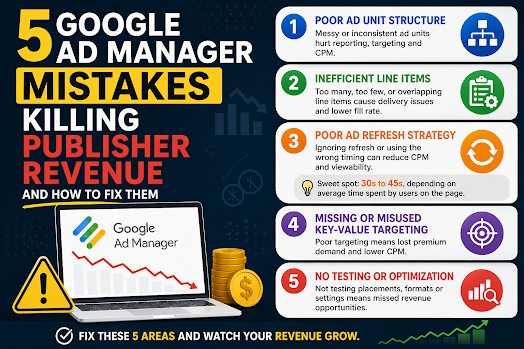
    1. Poor Google Ad Manager Ad Unit Structure

    One of the most common Google Ad Manager mistakes is a messy or inconsistent ad unit structure.

    Many publishers create ad units like:

    • homepage_banner_1
    • sidebar_ads
    • mobile_ad_random123

    While this may seem harmless, it creates serious scaling issues.

    Why this hurts publisher revenue:

    • weak inventory segmentation
    • poor reporting accuracy
    • inefficient programmatic targeting
    • reduced buyer understanding of inventory

    SEO & monetization impact:

    A poorly structured GAM setup reduces demand competition, which directly lowers CPM and overall revenue.

    Fix:

    Use a structured naming system:

    Format:
    site_section_placement_device

    Example:
    news_home_top_leaderboard_desktop

    This improves:

    • reporting clarity
    • targeting precision
    • ad demand optimization

    2. Inefficient Line Item Configuration in GAM

    Another major Google Ad Manager mistake is improper line item setup.

    Publishers often:

    • create too many overlapping line items
    • or rely on a single demand source

    Why this reduces revenue:

    • internal competition confusion
    • inefficient ad delivery prioritization
    • loss of high-value impressions

    Result:

    GAM cannot properly allocate impressions, leading to lower yield.

    Fix:

    • separate direct and programmatic demand clearly
    • avoid redundant line items
    • define clear priority hierarchy in GAM

    A clean structure improves:

    • fill rate
    • CPM stability
    • demand competition efficiency

    3. Poor Ad Refresh Strategy in Google Ad Manager

    Ad refresh is one of the most misunderstood GAM optimization tools.

    Many publishers either:

    • don’t use ad refresh at all
    • or implement overly aggressive refresh cycles

    Why this hurts revenue:

    • aggressive refresh lowers CPM (buyers devalue impressions)
    • no refresh misses long-session monetization opportunities
    • poor timing reduces viewability performance

    Best practice ad refresh strategy:

    The optimal approach is to balance refresh timing based on user engagement and page behavior.

    A practical ad refresh range is 30 to 45 seconds, depending on average time spent on page and viewability conditions.

    However, this is not a fixed rule.

    Better optimization approach:

    • Use longer refresh intervals for short-session pages
    • Apply 30–45s refresh only for high engagement content
    • Prioritize viewable refresh triggers over timer-based refresh alone

    This ensures:

    • higher CPM stability
    • better user experience
    • improved ad viewability scores

    4. Missing or Misused Key-Value Targeting in GAM

    Key-values are a powerful but often underused feature in Google Ad Manager.

    Common mistakes include:

    • not using key-values at all
    • overcomplicating setup
    • not aligning with demand partners

    Why this reduces revenue:

    Without proper segmentation, publishers lose:

    • audience targeting precision
    • premium demand access
    • higher CPM opportunities

    Fix:

    Start with simple key-values:

    • device type (mobile / desktop)
    • content category
    • geographic region

    Then expand only when necessary.

    Proper key-value usage improves:

    • programmatic targeting
    • demand matching efficiency
    • revenue per impression

    5. No Testing or Optimization Strategy in GAM

    Many publishers treat Google Ad Manager as a “set and forget” system.

    This is a major revenue killer.

    Without testing, you miss:

    • optimal ad placements
    • best-performing formats
    • highest RPM configurations

    Even small changes can significantly impact revenue.

    Examples of high-impact tests:

    • ad placement position changes
    • refresh timing adjustments
    • layout density optimization
    • format mix comparison

    Fix:

    Treat GAM as a continuous optimization system:

    • run placement tests
    • monitor RPM changes
    • track viewability performance
    • adjust based on data, not assumptions

    📊 Final Thoughts: Why Publishers Lose Revenue in GAM

    Most publishers don’t lose revenue because of traffic issues.

    They lose revenue because of:

    • poor GAM structure
    • inefficient setup
    • lack of optimization strategy

    The good news is that these are fully fixable without increasing traffic.

    In many cases, proper Google Ad Manager optimization alone can significantly increase:

    CPM stability

    RPM (Revenue per Mille)

    fill rate
  • How to Fix Low Fill Rate in Google Ad Manager (GAM)

    How to Fix Low Fill Rate in Google Ad Manager (GAM)

    How to Fix Low Fill Rate in Google Ad Manager (GAM)

    If your revenue drops despite steady traffic, the first metric to audit is your Fill Rate. A low fill rate indicates that your site is generating ad requests that aren’t converting into impressions. Essentially, you are leaving money on the table.

    What Is Fill Rate?

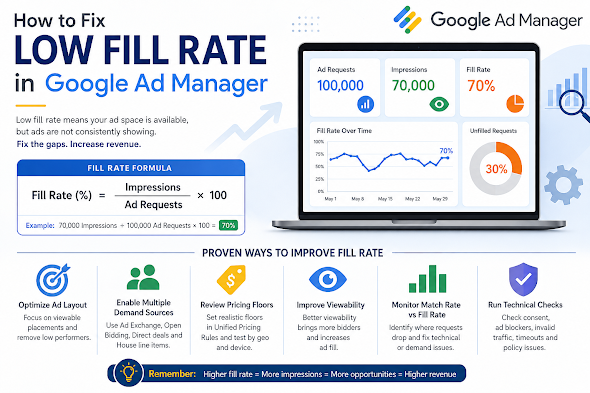
    Fill rate is the percentage of ad requests that result in a displayed ad.

    Example: If you have 100,000 ad requests but only 70,000 impressions, your fill rate is 70%. While “healthy” rates vary by niche, most publishers aim for 80–95% on standard display inventory.


    5 Common Culprits Behind Low Fill Rate

    ReasonThe Impact
    Low Geo DemandTraffic from Tier 3 countries often lacks the advertiser depth to fill every request.
    Ad Unit OverloadToo many ad units on one page dilute bid competition and slow down page rendering.
    Restrictive SizesUsing non-standard sizes (e.g., 200×200) limits the pool of available creative assets.
    Aggressive FloorsSetting CPM floors too high rejects bids that would otherwise have filled the slot.
    Technical LatencyIf the page loads too slowly, the user may scroll past or leave before the ad renders.

    Strategic Solutions to Boost Fill

    1. Optimize Pricing Rules (UPRs)

    Check your Unified Pricing Rules in GAM. If your floors are set based on peak seasonal demand (like Q4), they may be too high for slower periods.

    • Action: Experiment with “Floor Shifting.” Lower floors for specific low-demand geographies or devices to capture “long-tail” revenue.

    2. Diversify Your Demand Stack

    Don’t put all your eggs in the AdSense/AdX basket. High-growth publishers use a multi-layered approach:

    • Header Bidding: Bring in Prebid.js to force AdX to compete with external SSPs.
    • Open Bidding: Enable Google’s server-to-server demand.
    • Backfill/House Ads: Ensure you have a “catch-all” line item (like a self-promotion or a low-priority ad network) to ensure 0% of requests go to waste.

    3. Focus on “Signal” over “Volume”

    Advertisers bid more—and more often—on high-viewability inventory.

    • Lazy Loading: Only request the ad when the user is about to scroll to it. This reduces “unfilled” requests from the bottom of the page that never get seen.
    • Ad Refresh: If using auto-refresh, ensure it only triggers when the ad is in view.

    4. Standardize Ad Sizes

    Enable Multi-Size Pricing. Instead of just requesting a 300×250, allow the slot to accept 300×600 or 320×50. Increasing the number of eligible creatives for a single slot naturally drives up the fill rate.


    Technical Troubleshooting Checklist

    If your demand looks healthy but fill is still low, check for these “silent killers”:

    • CMP Issues: If your Consent Management Platform isn’t firing correctly, Google cannot serve personalized ads (or any ads) in regulated regions like the EU (GDPR).
    • app-ads.txt / ads.txt: Ensure your file is reachable and up to date. Missing entries will lead to immediate bid rejection.
    • Mismatched Line Items: Check if your line item targeting (Geo, Device, Key-values) is too narrow for the traffic you are receiving.
    • Rendering Timeouts: If your Header Bidding timeout is too short, the auction might close before bids arrive.


    Summary: When Should You Worry?

    A temporary dip during the start of a quarter (January, April, July, October) is normal as advertiser budgets reset. However, a sustained drop usually points to a pricing mismatch or a technical bottleneck.

    The Goal: Optimization isn’t about adding more ads; it’s about making your existing ad slots more “eligible” for the highest number of buyers possible.

  • The “Traffic vs. Revenue” Paradox: Why Your Ad Revenue Dropped (Despite Stable Traffic)

    The “Traffic vs. Revenue” Paradox: Why Your Ad Revenue Dropped (Despite Stable Traffic)

    The “Traffic vs. Revenue” Paradox: Why Your Ad Revenue Dropped (Despite Stable Traffic)

    Seeing your revenue dip while your traffic remains steady is a frustrating puzzle for any publisher. On the surface, it feels like a technical glitch—but in the world of modern ad tech, traffic is only one variable in a complex equation.

    Earnings are driven by a mix of advertiser demand, technical performance, and audience composition. If your “total visitors” count is the only metric you’re watching, you’re missing the forest for the trees.

    1. Macro-Economic & Seasonal CPM Shifts

    The most common culprit isn’t your site—it’s the market. CPMs (Cost Per Mille) are dictated by advertiser appetite, which fluctuates based on:

    • The “January Slump”: Following the high-spend holiday season (Q4), advertisers slash budgets in Q1, leading to a universal drop in CPMs.
    • Economic Headwinds: During inflation or recession scares, brands pivot from “brand awareness” (display ads) to “direct response” (search/social), lowering the auction pressure on your site.

    2. Shifts in “Audience Quality”

    Not all pageviews carry the same weight. A shift in where your traffic comes from can decimate your RPM (Revenue Per Mille):

    • Geography: 1,000 visitors from the US or UK (Tier 1) are often worth 5–10x more than 1,000 visitors from emerging markets due to advertiser competition.
    • Source: Organic search visitors usually have higher “intent” and stay longer than “viral” social media traffic, making them more valuable to bidders.

    3. The Viewability Trap

    Advertisers are increasingly savvy; they don’t just pay for “loaded” ads, they pay for seen ads.

    If your Viewability Score (the % of ads that are on-screen for at least one second) drops below 50–60%, premium bidders will flee. Common causes include:

    • Slow-loading ad units (the user scrolls past before the ad renders).
    • Content shifts (CLS) that push ads out of the viewport.
    • Lazy-loading configurations that are too aggressive.

    4. Technical Friction & “Signal Loss”

    The “behind-the-scenes” tech can often break without affecting the front-end user experience:

    • Consent Management (CMP) Failures: If your cookie consent banner isn’t firing correctly, you lose the ability to serve personalized ads, which can tank CPMs by 50% or more.
    • Privacy Updates: Increased tracking prevention in browsers like Safari and Firefox (and the slow fade of third-party cookies) means less data for advertisers, resulting in lower bids.
    • Ad Blockers: A tech-savvy audience shift can result in more “ghost” traffic—users who show up in your analytics but never request an ad.

    5. Inventory and Auction Pressure

    If you use Header Bidding or a Unified Auction, your revenue relies on competition.

    • Bidder Health: If one of your major SSPs (Supply Side Platforms) has a technical issue or pauses their spend on your domain, the lack of competition allows other bidders to win your inventory at lower prices.
    • Floor Prices: If you’ve set your “Hard Floors” too high, your fill rate will tank. If they are too low, you may be “leaving money on the table.”

    How to Diagnose the Drop: A Checklist

    Before panicking, run these reports in your Ad Server (GAM, AdSense, etc.) and compare the last 30 days to the previous period:

    Metric to CheckWhat it Tells You
    eCPM by GeographyDid your high-value US traffic drop while low-value traffic grew?
    Fill RateAre you failing to sell the inventory you have?
    Viewability %Are your ads loading too slowly or in the wrong places?
    Bid DepthIs the number of advertisers competing for your slots decreasing?
    CPM by DeviceIs a specific mobile update or layout change hurting mobile revenue?

  • How to Improve Ad Viewability on Websites

    How to Improve Ad Viewability on Websites

    In digital advertising, traffic alone is no longer enough. One of the biggest factors that directly impacts ad revenue today is ad viewability — a metric that measures whether users actually see the ads displayed on your website.

    A page can generate thousands of impressions, but if users never scroll far enough to see the ads, advertisers may pay less or stop bidding aggressively altogether.

    For publishers using platforms like Google Ad Manager or programmatic demand sources, improving viewability can significantly increase CPMs, advertiser trust, and long-term revenue performance.

    What Is Ad Viewability?

    According to industry standards from the Interactive Advertising Bureau (IAB), a display ad is considered viewable when:

    • At least 50% of the ad is visible on screen
    • For at least 1 continuous second

    For video ads, the requirement is typically:

    • 50% visible for at least 2 continuous seconds

    This means an ad loaded somewhere far below the fold may count as an impression, but not necessarily as a viewable impression.

    Why Viewability Matters

    Higher viewability usually leads to:

    • Better CPMs
    • Increased advertiser demand
    • Improved bidding competition
    • Higher Active View rates in GAM
    • Better user engagement
    • Stronger long-term monetization

    Many advertisers now optimize campaigns specifically around viewable inventory instead of raw impressions.


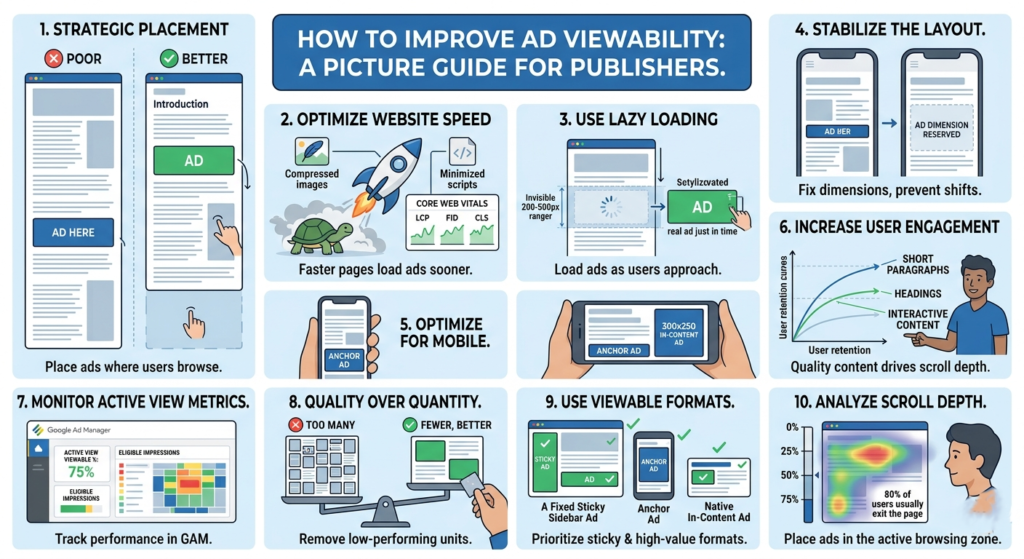
    1. Place Ads Above the Fold Carefully

    “Above the fold” refers to the section visible before users scroll.

    Ads placed too low on the page often suffer from poor viewability because visitors leave before reaching them.

    Good placements include:

    • Below the article title
    • Within the content after a few paragraphs
    • Sticky sidebar ads on desktop
    • Anchor ads on mobile

    Avoid stuffing too many ads at the very top. Excessive ad density can hurt user experience and increase bounce rate.

    Example of Better Placement

    Poor Placement

    • Ad appears after 1,500 words
    • Most users never reach it

    Better Placement

    • Ad appears after the introduction
    • Higher chance users actually see it

    2. Improve Website Speed

    Slow-loading websites reduce viewability because ads may load after users already scroll away.

    Focus on:

    • Compressing images
    • Using lazy loading
    • Reducing unnecessary scripts
    • Optimizing Core Web Vitals
    • Using lightweight themes

    A faster website gives ads more time to render while users are still viewing the page.

    Key Performance Areas

    • Largest Contentful Paint (LCP)
    • Interaction to Next Paint (INP)
    • Cumulative Layout Shift (CLS)

    These metrics also influence user retention and SEO performance.


    3. Use Lazy Loading for Ads

    Lazy loading delays ad requests until users approach the ad slot.

    Benefits include:

    • Faster initial page load
    • Better viewability
    • Reduced wasted impressions
    • Improved Active View metrics

    However, aggressive lazy loading can backfire if ads load too late. Balance is important.

    Many publishers configure ads to load when users are around 200–500px away from the slot.


    4. Reduce Layout Shifts

    If content jumps while loading, users may scroll unexpectedly past ads.

    This creates:

    • Poor user experience
    • Lower engagement
    • Reduced viewability

    Reserve fixed dimensions for:

    • Ad containers
    • Images
    • Embedded videos

    This helps stabilize the page while content loads.


    5. Optimize Mobile Experience

    Most website traffic today comes from mobile devices.

    Mobile-specific issues affecting viewability include:

    • Oversized ads
    • Slow mobile speed
    • Excessive sticky elements
    • Poor spacing
    • Intrusive popups

    Use responsive ad units and test placements across different screen sizes.

    Recommended Mobile Ad Sizes

    Common high-performing sizes include:

    • 320×50
    • 300×250
    • 320×100

    6. Increase User Engagement

    Users who stay longer on your site naturally view more ads.

    Ways to improve engagement:

    • Better article formatting
    • Strong introductions
    • Internal linking
    • Faster pages
    • Useful content
    • Cleaner design

    High bounce rates often correlate with lower viewability.

    Content Structure Tips

    • Use short paragraphs
    • Add headings regularly
    • Include images
    • Avoid large walls of text

    Good readability improves scroll depth.


    7. Monitor Active View Metrics in GAM

    If you use Google Ad Manager, monitor metrics such as:

    • Active View Viewable %
    • Active View Eligible Impressions
    • Measurable Impressions

    These reports help identify poorly performing placements.

    Low-performing ad units can then be:

    • Repositioned
    • Removed
    • Re-sized
    • Replaced with higher-performing formats

    8. Avoid Too Many Ads Per Page

    More ads do not always mean more revenue.

    Adding too many ad units can:

    • Slow the site
    • Lower viewability
    • Reduce competition
    • Hurt user trust

    Sometimes removing low-performing units actually increases overall RPM.

    Quality inventory generally performs better than excessive inventory.


    9. Test Different Ad Formats

    Some formats naturally achieve higher viewability.

    Examples:

    • Sticky sidebar ads
    • Anchor ads
    • In-content ads
    • Multiplex/native ads

    Formats that remain on screen longer tend to improve advertiser value.

    Always balance monetization with usability.


    10. Analyze Scroll Depth

    Understanding how far users scroll helps optimize ad placement.

    If most visitors only reach 40% of an article:

    • Ads below that point may never become viewable

    Use analytics tools to study:

    • Scroll behavior
    • Session duration
    • Exit points

    Then position ads where users are most active.