

Tag: Programmatic Ads

  • How to upload ads.txt file on your WordPress site

    How to upload ads.txt file on your WordPress site

    Adding an ads.txt file is typically required to get approval to monetize your website with ad networks.

    Here’s how you can upload an ads.txt file to your WordPress site:

    Method 1: Using an FTP Client

    1. Create Your ads.txt File:
      • Open a text editor (like Notepad or TextEdit).
      • Add the required lines to the file, specifying your ad network information.
      • Save the file as ads.txt.
    2. Connect to Your Website via FTP:
      • Use an FTP client (like FileZilla or Cyberduck) to connect to your web server.
      • Enter your FTP credentials (hostname, username, password, and port).
    3. Navigate to the Root Directory:
      • Once connected, navigate to the root directory of your WordPress installation, usually called public_html or the folder named after your domain.
    4. Upload the ads.txt File:
      • Drag and drop the ads.txt file from your computer into the root directory.
    5. Verify the Upload:
      • Open your browser and enter http://yourdomain.com/ads.txt to check if the file is accessible.

    Method 2: Using a File Manager in cPanel

    1. Create Your ads.txt File:
      • Follow the same steps as above to create and save the ads.txt file.
    2. Log into Your cPanel:
      • Access your hosting account and log into cPanel.
    3. Open File Manager:
      • Find and click on the File Manager icon.
    4. Navigate to the Root Directory:
      • Locate the root directory of your WordPress site (usually public_html).
    5. Upload the ads.txt File:
      • Click on the Upload button in the File Manager.
      • Select your ads.txt file and upload it.
    6. Verify the Upload:
      • As before, check by navigating to http://yourdomain.com/ads.txt in your browser.

    Method 3: Using a Plugin

    If you prefer a more user-friendly method, you can use a plugin:

    1. Install a Plugin:
      • Go to your WordPress dashboard.
      • Navigate to Plugins > Add New.
      • Search for a plugin like Ads.txt Manager or Insert Headers and Footers.
    2. Activate the Plugin:
      • Once installed, activate the plugin.
    3. Configure the Plugin:
      • Follow the plugin instructions to upload or enter the content for your ads.txt file.
    4. Save and Verify:
      • Save the changes and verify the upload by checking http://yourdomain.com/ads.txt.

    Final Steps

    Regardless of the method you choose, always remember to verify that the ads.txt file is accessible. This is essential for ad networks to recognize and validate your site.
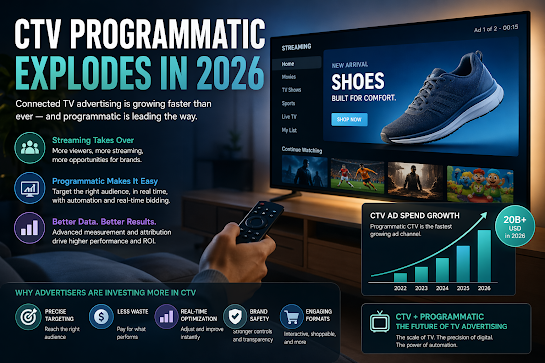
  • The Programmatic CTV Explosion of 2026

    The Programmatic CTV Explosion of 2026

    📺 The Programmatic CTV Explosion of 2026

    Connected TV (CTV) has shed its “emerging channel” label. In 2026, it is the undisputed heavyweight of digital advertising, fueled by the total convergence of streaming scale and AI-driven precision.

    🚀 Why the Explosion is Peaks in 2026

    The shift is no longer a “trend”—it’s a completed migration.

    1. The “Tipping Point” of Viewership
      • Streaming Surpasses Linear: For the first time, streaming accounts for over 45% of all TV viewing, officially overtaking broadcast and cable combined.
      • The Rise of FAST: Free Ad-Supported TV (Pluto, Tubi, Samsung TV Plus) has become the new “basic cable,” offering massive reach for programmatic buyers.
    2. Agentic AI Integration
      • In 2026, we’ve moved past simple automation to Agentic AI. AI agents now manage real-time bidding, “attention-adjusted” pricing, and creative optimization without manual intervention.
    3. Retail Media & First-Party Data
      • With the death of the cookie, CTV has become the hero of First-Party Data. Brands now link retail purchase data (e.g., Walmart, Amazon) directly to TV impressions to prove exactly who bought a product after seeing an ad.

    📈 From Branding to Performance

    Traditional TV was a “reach” play. 2026 CTV is a “results” play.

    FeatureTraditional TV (Linear)Programmatic CTV (2026)
    TargetingBroad Demographics (Age/Gender)Household-level (Interests/Buying Habits)
    BuyingManual IOs & UpfrontsReal-Time Bidding (RTB)
    OptimizationStatic (Fixed 30-sec spots)Dynamic (AI-adjusted creative)
    MeasurementGRPs & EstimatesDirect Attribution (Web visits/Sales)

    🎨 New “Active” Ad Formats

    Viewers are no longer passive. The TV screen is now an interactive storefront:

    • Pause Ads: High-impact, non-intrusive ads that appear when content is paused—now rated the most effective CTV format.
    • Shoppable Overlays: AI-powered “click-to-cart” features that allow viewers to buy products via their remote or synced mobile device.
    • Home Screen Mastery: The Smart TV OS (Roku, Fire TV) is the new “Prime Time,” with ads appearing on the home screen before a user even picks a show.

    ⚠️ The Remaining Hurdles

    Despite the boom, the industry is still navigating:

    • Measurement Fragmentation: While tracking is better, “standardization” across Netflix, Disney+, and YouTube remains a work in progress.
    • The Ad Load Balance: As platforms push for revenue, “ad fatigue” is a growing risk. Quality and relevance are now more important than frequency.
    • Identity Resolution: Moving away from IP addresses toward more secure, privacy-compliant “Alternative IDs.”

    🔮 The Bottom Line

    In 2026, TV is no longer just a branding channel—it is a performance engine. The brands winning today are those that treat CTV like a giant, high-definition version of search or social: data-driven, automated, and hyper-personalized. By combining the emotional power of the “Big Screen” with the surgical precision of AI, programmatic CTV has become the most essential line item in the modern marketing budget.