
Tag: programmatic advertising

  • The Biggest Quiet Power Move in Ad Tech Just Happened — And It Changes Everything

    The Biggest Quiet Power Move in Ad Tech Just Happened — And It Changes Everything

    Most people outside the ad industry won’t notice this yet. But inside ad tech? This is being called one of the most critical infrastructure deals of the decade.

    Publicis Groupe has officially agreed to acquire LiveRamp in an all-cash deal representing a $2.167 billion enterprise value ($2.546 billion equity value). As reported by Reuters, the blockbusting move marks a massive escalation in the race to control the future of data, identity, and AI-driven marketing.

    If that sounds deeply technical—it is. But the takeaway is simple:

    Whoever controls data connectivity controls modern advertising.

    🧠 Why This Deal Matters More Than It Looks

    LiveRamp isn’t just another ad tech company; it is the industry’s central nervous system for identity. It quietly enables brands to safely onboard, match, and connect customer data across 25,000+ publisher domains and 500+ technology partners.

    By absorbing LiveRamp into Publicis—one of the “Big Four” global advertising holding companies—the traditional boundaries of the industry are shifting overnight.

    By owning the plumbing, Publicis gains a staggering competitive edge:

    • Unprecedented Identity Control: Total integration of LiveRamp’s identity graph with Publicis’ existing data crown jewel, Epsilon.
    • Fuel for “Agentic Advertising”: True AI-driven marketing can’t run on generic data. It requires clean, continuous, proprietary data loops to execute and optimize campaigns autonomously.
    • The Death of Neutral Infrastructure: LiveRamp has historically acted as an independent, neutral Switzerland for data collaboration. That era is officially ending.

    ⚡ The Real Signal: The Land Grab for the AI Stack

    This isn’t just standard corporate consolidation. It is a land grab for the foundational layer of AI marketing.

    Publicis CEO Arthur Sadoun noted that the acquisition allows clients to practice “data co-creation”—the secure blending of multiple high-value data sources to build and train proprietary AI agents on top of leading large language models (LLMs). For example, a bank could now effortlessly spin up a highly compliant AI wealth management agent that securely synthesizes data from dozens of fragmented sources to target and cross-sell products flawlessly.

    This hyper-aggressive tech pivot has left competitors scrambling. The line between an “agency” that designs ads and a “tech platform” that moves data has vanished entirely.

    🧩 The 3 Major Shifts Accelerating Next

    ShiftThe Old WayThe New Reality
    1. Identity BattlegroundTracking users via third-party cookies.First-party data collaboration via secure “clean rooms.”
    2. Holding Company ROIBuying media volume to get discounts.Owning the data pipes and charging for structural infrastructure.
    3. AI Training GroundFeeding AI generic, public internet data.Feeding AI proprietary, brand-specific “co-created” data assets.

    ⚠️ The Industry Reaction is Polarized

    While Wall Street applauded the move—prompting Publicis to aggressively upgrade its financial growth targets through 2028—the broader ad tech community is anxious.

    • The Switzerland Problem: Will independent brands and rival holding companies trust LiveRamp with their first-party data now that it’s owned by a direct competitor?
    • Monopoly Fears: The sheer concentration of data power under Publicis (Epsilon + LiveRamp) creates an intimidating walled garden that few can replicate.
    • The Copycat Pressure: Heavyweights like WPP, Omnicom, and Interpublic Group (IPG) are now under immense structural pressure to buy or build an equivalent data layer before they get locked out.

    📌 The Bottom Line

    This isn’t just another multi-billion dollar tech transaction. It represents a paradigm shift in who owns the actual foundation of digital media.

    As digital advertising enters its autonomous, agent-led era, the question is no longer who can write the best ad copy or buy the cheapest media. The question is: If data is the true infrastructure of AI, who gets to control the signal layer—and who gets locked out?

  • Why Ads Don’t Show on Your Website (And How to Fix It)

    Why Ads Don’t Show on Your Website (And How to Fix It)

    If your website ads suddenly stopped appearing — or never showed up at all — you’re not alone. This is one of the most common problems publishers face, especially with platforms like Google AdSense and other ad networks.

    Sometimes the issue is simple. Other times it’s caused by policy restrictions, technical conflicts, or low-quality traffic. The good news is that most ad display issues can be fixed once you identify the root cause.

    1. Your Site Is Still Under Review

    Many ad networks manually or automatically review websites before serving ads. During this period, ad spaces will remain blank.

    • Common Signs: Ads show as empty containers, your dashboard reads “Getting ready” (common in Google AdSense), or ads appear randomly on a few pages but not others.
    • The Fix: Wait 24 to 72 hours post-approval. Keep publishing original content and avoid changing your site’s theme or critical plugins during active review windows. ( This sometimes takes 1-2 weeks specially if it’s your first time monetizing the site).

    2. Active Ad Blockers

    A massive portion of web traffic uses ad-blocking software, which strips out ad scripts before the page even finishes rendering.

    • The Impact: You see zero ads on your own device, revenue looks unusually low, and ads work fine for some visitors but fail for others.
    • How to Test: Open your site in an Incognito/Private window, temporarily disable desktop browser extensions, or test the URL on a mobile device using a standard browser. Common culprits include uBlock Origin, AdBlock Plus, and Brave Browser Shields.

    3. Broken or Incorrect Ad Code Placement

    A tiny syntax error or a bad copy-paste job during ad code installation will completely prevent ads from rendering.

    • Common Issues: Missing HTML closing tags (), dropping ad codes into unsupported sidebar widgets, or layout conflicts within your theme.
    • WordPress Specifics: Script optimization features in popular plugins frequently break ad delivery. Watch out for conflicts with:
      • Caching Plugins (e.g., WP Rocket, LiteSpeed Cache)
      • Minification Tools (combining CSS/JS)
      • Lazy-Load Plugins (delaying ad scripts until a user scrolls)
    • The Fix: Re-copy the clean code directly from your ad network dashboard. Turn off JavaScript optimization temporarily to see if the ads return.

    4. Policy Violations and Content Restrictions

    Ad networks protect their advertisers by limiting or disabling ad serving on pages that feature restricted or high-risk content.

    • High-Risk Content: Pages with copyrighted media, adult or shocking material, misleading download buttons, low-value/spammy AI-generated content, or heavy keyword stuffing.
    • The Fix: Even if your domain is fully approved, individual pages can be penalized. Check your ad network’s Policy Center regularly to clear any flagged URLs.

    5. Low Traffic or Poor Traffic Quality

    Networks prioritize advertiser budgets. If your traffic profiles look automated or low-value, ad networks will throttle your ad inventory.

    Quality over Quantity: Advertisers want human engagement. 100 highly engaged organic visitors are worth more than 10,000 automated views.

    • Avoid at all costs: Paid traffic farms, auto-refresh traffic exchanges, and click-incentive schemes.
    • The Fix: Focus on building clean, high-value traffic channels like organic Google search, natural social media shares, and returning direct readers.

    6. Privacy and Cookie Consent Plugins

    Strict privacy regulations (like GDPR and CCPA) mean that if a user rejects cookies—or if your setup is broken—ad scripts are completely blocked from initializing.

    • The Problem: If your cookie banner resets continuously or misconfigures script blocking, ads will never load for your visitors.
    • The Fix: Visit your site, manually accept the cookie prompts, and see if the ads appear. You can also use a VPN to test how your site handles consent across different global regions.

    7. Formatting Errors in Your ads.txt File

    An incorrect or missing ads.txt file signals to programmatic buyers that your ad inventory isn’t verified, causing advertiser demand to drop to zero instantly.

    • Common Mistakes: Typographical errors in your Publisher ID, duplicate entries, or missing authorized seller rows.
    • The Fix: Verify your file directly by navigating to yourdomain.com/ads.txt. Ensure the page loads publicly as plain text without redirecting or throwing formatting errors.

    8. Limited Inventory on New Domains

    Brand new websites and fresh domains face a natural “warm-up” period where ad networks evaluate the platform’s stability.

    • What Networks Evaluate: Historical site trust, content depth, user engagement metrics, and overall niche stability.
    • The Results: New sites frequently experience blank ad spaces, Public Service Announcement (PSA) ads, or exceptionally low Cost Per Mille (CPM) rates. Consistency in publishing matters far more here than constantly redesigning your layout.

    9. Aggressive Caching and CDN Conflicts

    Over-optimized site speed settings can accidentally cache the “blank” state of an ad or defer vital ad delivery scripts indefinitely.

    • Potential Causes: Features like Cloudflare Rocket Loader, HTML edge caching, and aggressive JavaScript deferral strategies.
    • The Fix: Clear your website plugin cache, flush your CDN (like Cloudflare), empty your local browser cache, and reload the page.

    10. Account-Level Ad Serving Limits

    Networks like Google AdSense frequently apply temporary ad serving limits if they detect patterns that mimic invalid click traffic.

    • Key Indicators: A sudden, steep drop in revenue overnight, highly inconsistent ad rendering, and account warning banners.
    • The Fix: This does not mean you are permanently banned. Address it by auditing your analytics for spam traffic, focusing heavily on content quality, and strictly avoiding accidental self-clicks during site development.
  • AI Is Now Running Entire Ad Campaigns — Not Just Assisting Them

    AI Is Now Running Entire Ad Campaigns — Not Just Assisting Them


    🚀 AI Is Now Running Entire Ad Campaigns — Not Just Assisting Them

    For years, artificial intelligence has played a supporting role in advertising—helping marketers optimize bids, suggest keywords, or generate ad creatives.

    But that era is ending.

    Welcome to the age of AI-operated marketing, where machines don’t just assist—they run entire ad campaigns from start to finish.


    🤖 From Assistant to Decision-Maker

    Traditional adtech tools relied heavily on human input:

    • Marketers set targeting rules
    • Media buyers adjusted budgets
    • Creatives were manually tested

    Today, new AI systems are evolving into agentic AI—technology capable of:

    • Planning campaign strategy
    • Selecting target audiences
    • Generating ad creatives
    • Allocating budgets
    • Optimizing performance in real time

    All with minimal human intervention.

    👉 In short: AI is no longer a tool. It’s becoming the marketer.


    🧠 What Is “Agentic AI” in Advertising?

    Agentic AI refers to systems that can act independently toward a goal.

    In adtech, this means:

    • Understanding campaign objectives (e.g., conversions, awareness)
    • Making decisions dynamically based on live data
    • Continuously learning and improving performance

    Some platforms are even incorporating neuro-contextual signals—analyzing user behavior, emotion, and context to determine the perfect moment to deliver an ad.


    📊 What This Means for Advertisers

    This shift is massive. Here’s how it changes the game:

    1. ⚡ Faster Campaign Execution

    Campaigns that once took days (or weeks) to launch can now go live in minutes.

    2. 🎯 Smarter Targeting

    AI doesn’t rely on static audience segments—it adapts in real time based on behavior and intent.

    3. 💰 Better ROI

    With continuous optimization, budgets are allocated more efficiently, reducing wasted spend.

    4. 🔄 Always-On Optimization

    No more manual A/B testing—AI tests, learns, and adjusts automatically.


    👀 The Catch: Less Control for Humans

    While the benefits are clear, there’s a trade-off.

    Marketers may face:

    • Reduced visibility into decision-making (“black box” AI)
    • Less hands-on control over campaigns
    • Increased reliance on platform algorithms

    👉 The role of marketers is shifting from execution → oversight and strategy.


    🔮 The Future of AdTech

    We’re heading toward a world where:

    • AI agents negotiate ad placements in real time
    • Campaigns self-adjust across multiple platforms
    • Ads become hyper-personalized to individual users

    And possibly…

    👉 Entire marketing departments powered by AI.


    🧠 Final Thoughts

    The rise of agentic AI marks one of the biggest transformations in advertising history.

    Those who adapt early will gain a massive advantage.
    Those who don’t risk being left behind.

    Because in 2026 and beyond, the question is no longer:

    “How can AI help my campaigns?”

    It’s:

    “Am I ready to let AI run them?”

  • OpenAI’s Next Big Move: Ads That Talk Back in ChatGPT

    OpenAI’s Next Big Move: Ads That Talk Back in ChatGPT

    OpenAI’s Next Big Move: Ads That Talk Back in ChatGPT

    OpenAI is making a bold bet on interactive, conversational advertising inside ChatGPT. After testing standard ad placements earlier this year, the AI company is now partnering with ad-tech firms to develop ads that don’t just sit there — they actually engage users in a conversation.

    This move positions OpenAI at the cutting edge of what many in the industry are calling conversational commerce, where ads blur the line between AI assistance and marketing. (thenextweb.com)


    Partnership With Smartly: Bringing Dialogue to Ads

    OpenAI’s latest collaboration is with Helsinki-based Smartly, a platform known for automation and AI-powered ad optimization. The goal? Ads that respond to user input — not just display static messages or links.

    Imagine asking ChatGPT a question about travel, and an ad for a flight booking platform not only shows up but also answers follow-up queries about dates, prices, and destinations — in a conversational tone similar to ChatGPT itself.

    “This is about creating interactive ad formats that respond to users rather than simply being displayed beside results,” says industry reporting. (businessinsider.com)”

    The partnership is currently focused on retail, entertainment, and lifestyle brands, but the long-term vision is broader: any brand could deploy AI-assisted, natural-language interactions directly inside ChatGPT.


    From Pilot to Monetization

    OpenAI’s conversational ad strategy builds on a February 2026 pilot that brought ads to ChatGPT in the U.S. This pilot attracted over 600 advertisers and generated roughly $100 million in annualized revenue in just six weeks.

    Currently, ads appear beneath ChatGPT responses and are clearly labeled, a practice OpenAI insists on to preserve transparency and trust. But conversational ads will take the labeling a step further by mimicking the chat interface itself — potentially creating a more seamless, yet interactive, experience for users.


    Why Advertisers Are Excited

    Marketers are eager for this evolution because it allows them to:

    1. Engage users directly: Instead of hoping for a click-through, ads can answer questions and guide consumers.
    2. Personalize in real time: Conversational AI can tailor responses to individual needs and interests.
    3. Collect richer insights: Conversations provide more detailed data than clicks or impressions alone.

    Industry experts note that interactive ads could outperform traditional banners because they feel integrated into the user experience rather than interrupting it.


    Challenges Ahead

    Despite the promise, OpenAI faces several hurdles:

    • Trust and user experience: Users may be wary of ads masquerading as AI responses. OpenAI has promised clear labeling, but balancing engagement with transparency will be critical.
    • Content moderation: Ads need to be accurate, non-deceptive, and compliant with platform rules. Conversational AI could introduce new compliance risks.
    • Technical scalability: Managing thousands of real-time conversational ads without latency or errors is a major engineering challenge.

    Sam Altman, OpenAI CEO, has emphasized that user trust remains paramount, noting that ads must never interfere with the AI’s ability to provide factual and helpful responses. (businessinsider.com)


    Industry Implications

    The initiative signals a broader shift in digital advertising:

    • From impressions to interactions: Traditional metrics like views and clicks may become secondary to engagement and conversation quality.
    • AI-driven commerce: Brands could sell products and services directly through AI conversations, creating a new revenue stream for both advertisers and AI platforms.
    • New ad-tech demand: Conversational ads require sophisticated AI, natural-language understanding, and dynamic creative optimization — potentially spawning a new sector of ad tech startups.

    Other AI companies, including Anthropic and Google, are already experimenting with similar formats, highlighting a growing arms race for AI-powered engagement.


    Looking Ahead

    OpenAI has not announced when conversational ads will be widely available. But the combination of strategic partnerships, seasoned ad-tech hires, and pilot successes suggests this new ad format could become mainstream within the next year.

    For brands, this means preparing for a future where AI does more than answer questions — it also sells, persuades, and interacts. For users, it’s a chance to experience a more dynamic and personalized digital conversation — if done correctly.

    The next chapter in advertising may not be banners or pop-ups at all. It may be your chatbot turning into a conversation partner that also happens to be an ad.

  • How to Use AI for Smarter Ad Placements: A Beginner’s Guide

    How to Use AI for Smarter Ad Placements: A Beginner’s Guide

    How to Use AI for Smarter Ad Placements: A Beginner’s Guide

    In the modern digital landscape, running ads without data is essentially “spraying and praying”—and that’s an expensive way to fail.

    The good news? You don’t have to be a data scientist to win. AI-powered tools within Google Ads and Meta Ads Manager now do the heavy lifting for you, automating the “where, when, and who” of your campaigns. This guide will show you how to leverage AI to stop wasting your budget and start reaching the right people.


    🤖 What Exactly Does AI Do for Your Ads?

    Think of AI as a 24/7 marketing assistant that never sleeps. It processes millions of data points in milliseconds—something no human could ever do manually.

    AI analyzes:

    • User Behavior: Who is clicking, scrolling, or watching?
    • Contextual Data: What device are they on? Where are they located?
    • Timing: When is a user most likely to make a purchase?

    The Shift: Instead of you guessing which website or app your customer visits, the AI identifies the intent and places your ad exactly where that person is at that moment.


    🎯 3 Ways to Leverage AI Right Now

    1. Smart Audience Targeting

    AI doesn’t just look at demographics; it looks at patterns. It finds “Lookalike Audiences”—people who behave exactly like your existing customers but haven’t discovered you yet.

    • Try this: Use Meta’s Lookalike Audiences or Google’s Predictive Segments.

    2. Automated Placement (The “Set It and Forget It” Advantage)

    Instead of manually picking “Instagram Stories” or “YouTube Sidebar,” let the machine decide.

    • The Tool: Meta Advantage+ Placements or Google Performance Max.
    • The Result: Your ad automatically shifts to whichever sub-platform is currently delivering the cheapest conversions.

    3. Real-Time Budget Optimization

    AI monitors which ads are winning and moves your money there instantly.

    • The Tool: Campaign Budget Optimization (CBO).
    • The Result: You stop spending money on “dud” ads and double down on winners without lifting a finger.

    🚀 Your 5-Step AI Starter Strategy

    If you’re ready to start, follow this “Low-Stress” workflow:

    1. Choose One Arena: Don’t be everywhere at once. Start with either Meta (Social) or Google (Search/Video).
    2. Trust the Algorithm: When setting up your campaign, select “Automatic Placements.” 3. Go Broad: Avoid hyper-niche targeting. Give the AI a larger pool of people so it has enough data to learn.
    3. The “Power of 3”: Upload at least 3 different images or videos. AI needs options to test which one resonates.
    4. The 7-Day Rule: Do not touch your ads for at least 5–7 days. This is the “Learning Phase” where the AI is calibrating.


    ⚠️ Mistakes That Kill AI Performance

    The Mistake
                                            Why it Hurts
    Micro-ManagingChanging settings every 24 hours resets the AI’s “learning” process.
    Over-TargetingAdding too many filters (age + interest + location + behavior) suffocates the AI.
    Bad CreativeAI can find the right person, but it can’t make a boring ad interesting.

  • Commerce + AI Search: The New Ad Battleground

    Commerce + AI Search: The New Ad Battleground

    Commerce + AI Search: The New Ad Battleground

    The digital marketing landscape is currently undergoing its most significant structural shift since the invention of the keyword. We are moving away from the era of “Search and Scroll”—where users act as their own filters—and into the era of “Ask and Act,” where AI serves as both the researcher and the checkout clerk.

    This isn’t just a change in how ads look; it’s a total reimagining of how commerce functions online. Here is how the battleground is being redrawn.


    1. Google’s Closed-Loop Revolution

    For decades, Google’s business model was simple: get the user to click and leave. Now, Google is building a closed-loop commerce system designed to keep the entire transaction within its own interface.

    • AI Mode & Direct Offers: Google’s AI-powered search now allows users to compare brands and receive tailored “Direct Offers,” such as loyalty benefits or exclusive discounts, without ever leaving the search results page.
    • The Death of the Referral: Clicks are becoming secondary to “conversions-in-place.” By integrating payment credentials directly into AI interfaces, Google is turning Search from a directory into a massive, distributed storefront.

    2. The Fragmentation of Retail Media

    Retail Media Networks (RMNs) have moved beyond simple “sponsored products” to become the primary infrastructure of digital advertising. However, this has created a fragmented map where brands must fight on multiple fronts:

    • Ecosystem Wars: Major retailers like Amazon and Walmart now offer Agentic Commerce Optimization (ACO), ensuring their proprietary data is the primary source when an AI assistant is asked to “find the best product.”
    • The Zero-Click Challenge: To combat AI “zero-click” searches—where an AI answers a query without sending traffic to a site—retailers are doubling down on highly localized data and in-store digital media to reach consumers where AI agents cannot yet intercept the journey.

    3. From Clicks to “Purchase Journeys”

    The shift from Click-Through Rates to Journey Completion Rates marks a fundamental change in digital strategy. Brands are no longer just fighting for a visit; they are competing to be the definitive choice at the end of an AI’s research process. This requires moving beyond catchy headlines toward “Agentic Readability”—structuring product data so AI models can instantly verify inventory, pricing, and specs to close the sale within the interface.

    In this new landscape, the “browsing” phase is being outsourced to machines. While traffic volumes may tighten, the intent behind those interactions is far higher. Recent 2026 data shows that AI-driven commerce journeys convert significantly better than traditional search because the decision-making has already happened. To stay relevant, brands must ensure their data is machine-ready, or risk becoming invisible to the automated assistants now handling the modern consumer’s wallet.


    The Verdict: Adapt or Be Intercepted

    The ad battleground is no longer about winning the auction for a single keyword. It is about winning the logic of the AI assistant. If your product data isn’t machine-readable, or if your checkout isn’t integrated into these emerging closed loops, you are effectively invisible to a massive portion of the market.

    In this new era, the brand that wins isn’t necessarily the one with the biggest ad budget—it’s the one that is most “useful” to the AI making the decision.

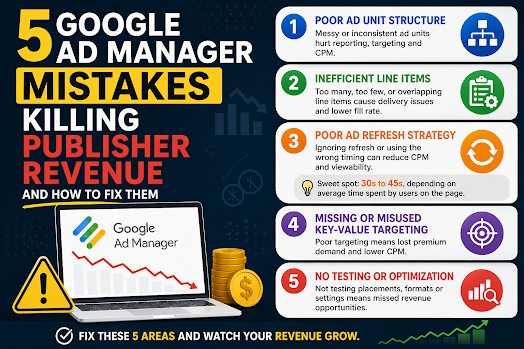
  • 5 Google Ad Manager Mistakes That Are Killing Publisher Revenue (And How to Fix Them)

    5 Google Ad Manager Mistakes That Are Killing Publisher Revenue (And How to Fix Them)

    5 Google Ad Manager Mistakes That Are Killing Publisher Revenue (And How to Fix Them)

    Many publishers assume low ad revenue is caused by traffic drops or weak SEO.

    But in reality, most revenue loss comes from poor Google Ad Manager (GAM) configuration and optimization mistakes that quietly reduce performance.

    Even experienced publishers overlook these issues.

    In this guide, we’ll break down the 5 most common GAM mistakes that hurt publisher revenue and how to fix them using real-world ad operations logic.


    1. Poor Google Ad Manager Ad Unit Structure

    One of the most common Google Ad Manager mistakes is a messy or inconsistent ad unit structure.

    Many publishers create ad units like:

    • homepage_banner_1
    • sidebar_ads
    • mobile_ad_random123

    While this may seem harmless, it creates serious scaling issues.

    Why this hurts publisher revenue:

    • weak inventory segmentation
    • poor reporting accuracy
    • inefficient programmatic targeting
    • reduced buyer understanding of inventory

    SEO & monetization impact:

    A poorly structured GAM setup reduces demand competition, which directly lowers CPM and overall revenue.

    Fix:

    Use a structured naming system:

    Format:
    site_section_placement_device

    Example:
    news_home_top_leaderboard_desktop

    This improves:

    • reporting clarity
    • targeting precision
    • ad demand optimization

    2. Inefficient Line Item Configuration in GAM

    Another major Google Ad Manager mistake is improper line item setup.

    Publishers often:

    • create too many overlapping line items
    • or rely on a single demand source

    Why this reduces revenue:

    • internal competition confusion
    • inefficient ad delivery prioritization
    • loss of high-value impressions

    Result:

    GAM cannot properly allocate impressions, leading to lower yield.

    Fix:

    • separate direct and programmatic demand clearly
    • avoid redundant line items
    • define clear priority hierarchy in GAM

    A clean structure improves:

    • fill rate
    • CPM stability
    • demand competition efficiency

    3. Poor Ad Refresh Strategy in Google Ad Manager

    Ad refresh is one of the most misunderstood GAM optimization tools.

    Many publishers either:

    • don’t use ad refresh at all
    • or implement overly aggressive refresh cycles

    Why this hurts revenue:

    • aggressive refresh lowers CPM (buyers devalue impressions)
    • no refresh misses long-session monetization opportunities
    • poor timing reduces viewability performance

    Best practice ad refresh strategy:

    The optimal approach is to balance refresh timing based on user engagement and page behavior.

    A practical ad refresh range is 30 to 45 seconds, depending on average time spent on page and viewability conditions.

    However, this is not a fixed rule.

    Better optimization approach:

    • Use longer refresh intervals for short-session pages
    • Apply 30–45s refresh only for high engagement content
    • Prioritize viewable refresh triggers over timer-based refresh alone

    This ensures:

    • higher CPM stability
    • better user experience
    • improved ad viewability scores

    4. Missing or Misused Key-Value Targeting in GAM

    Key-values are a powerful but often underused feature in Google Ad Manager.

    Common mistakes include:

    • not using key-values at all
    • overcomplicating setup
    • not aligning with demand partners

    Why this reduces revenue:

    Without proper segmentation, publishers lose:

    • audience targeting precision
    • premium demand access
    • higher CPM opportunities

    Fix:

    Start with simple key-values:

    • device type (mobile / desktop)
    • content category
    • geographic region

    Then expand only when necessary.

    Proper key-value usage improves:

    • programmatic targeting
    • demand matching efficiency
    • revenue per impression

    5. No Testing or Optimization Strategy in GAM

    Many publishers treat Google Ad Manager as a “set and forget” system.

    This is a major revenue killer.

    Without testing, you miss:

    • optimal ad placements
    • best-performing formats
    • highest RPM configurations

    Even small changes can significantly impact revenue.

    Examples of high-impact tests:

    • ad placement position changes
    • refresh timing adjustments
    • layout density optimization
    • format mix comparison

    Fix:

    Treat GAM as a continuous optimization system:

    • run placement tests
    • monitor RPM changes
    • track viewability performance
    • adjust based on data, not assumptions

    📊 Final Thoughts: Why Publishers Lose Revenue in GAM

    Most publishers don’t lose revenue because of traffic issues.

    They lose revenue because of:

    • poor GAM structure
    • inefficient setup
    • lack of optimization strategy

    The good news is that these are fully fixable without increasing traffic.

    In many cases, proper Google Ad Manager optimization alone can significantly increase:

    CPM stability

    RPM (Revenue per Mille)

    fill rate

  • How Programmatic Really Decides Your Earnings

    How Programmatic Really Decides Your Earnings

    How Programmatic Really Decides Your Earnings

    Discover how programmatic ads actually determine your revenue. Learn key factors like viewability, demand, ad refresh, and optimization strategies.

    What Is Programmatic Advertising?

    Programmatic advertising is the automated buying and selling of ad inventory using real-time auctions. Instead of manual deals, advertisers bid on your ad space through platforms like Google Ad Manager.

    Each time a user loads your page, an auction happens instantly—and the highest qualified bid wins.


    The Key Factors That Decide Your Earnings

    1. User Quality (Geo + Intent)

    Not all traffic is equal.

    Advertisers pay more for users who are:

    • From high-value countries (US, UK, CA, AU)
    • Likely to convert (buyers vs browsers)
    • Returning visitors with behavioral data

    👉 A US visitor can be worth 5–10x more than traffic from lower CPM regions.


    2. Demand Density (Advertiser Competition)

    Your earnings increase when more advertisers are competing for your inventory.

    Factors that increase demand:

    • Niche content (finance, tech, health = high CPM)
    • Seasonal spikes (Q4 = highest demand)
    • Strong audience targeting

    Low competition = lower bids = lower revenue.


    3. Viewability (The Silent Revenue Killer)

    If ads aren’t seen, they aren’t valuable.

    Most advertisers optimize for:

    • 50% of the ad visible for at least 1 second (display)
    • Higher viewability = higher CPM bids

    👉 Ads below the fold or poorly placed will significantly reduce earnings.


    4. Ad Refresh Strategy

    Refreshing ads can boost revenue—but only if done correctly.

    Best practice:

    • Refresh ads every 30–45 seconds
    • Base timing on average session duration
    • Avoid aggressive refresh (can reduce bid quality)

    👉 Smart refresh = more impressions without hurting user experience.


    5. Floor Prices (Pricing Control)

    Floor prices set the minimum bid advertisers must meet.

    • Too high → fewer bids (unsold inventory)
    • Too low → undervalued impressions

    👉 The goal is dynamic floors that adjust based on demand.


    6. Latency (Speed Matters More Than You Think)

    Slow pages kill revenue.

    Why?

    • Auctions timeout
    • Bidders drop off
    • Fewer bids = lower CPM

    👉 A delay of even 1 second can reduce revenue significantly.


    7. Ad Layout & Density

    Where and how many ads you place matters.

    • Above-the-fold placements = highest value
    • Sticky ads perform well
    • Too many ads = lower user experience + lower bids

    👉 Balance is key: optimize for both UX and revenue.


    8. Auction Type (First-Price vs Second-Price)

    Most exchanges now use first-price auctions, meaning:

    • Advertisers pay what they bid

    This increases competition—but also makes bid strategies more complex.

    👉 Better setup = smarter bids = higher earnings.


    The Real Truth About Programmatic Revenue

    Programmatic doesn’t “decide” your earnings randomly.

    It’s driven by:

    • Your audience quality
    • Your technical setup
    • Your optimization strategy

    Two sites with the same traffic can earn very different revenue—because one understands these levers, and the other doesn’t.


    How to Maximize Your Earnings

    Here’s a quick action checklist:

    • Improve traffic quality (focus on high-value geos)
    • Optimize ad placements for viewability
    • Use smart ad refresh (30–45 seconds sweet spot)
    • Reduce page load time and latency
    • Test floor pricing strategies
    • Monitor bidder competition

  • Google’s Data Manager Map View: A New Era of First-Party Data Visibility in Ad Tech

    Google’s Data Manager Map View: A New Era of First-Party Data Visibility in Ad Tech

    📊 Google’s Data Manager Map View: A New Era of First-Party Data Visibility in Ad Tech

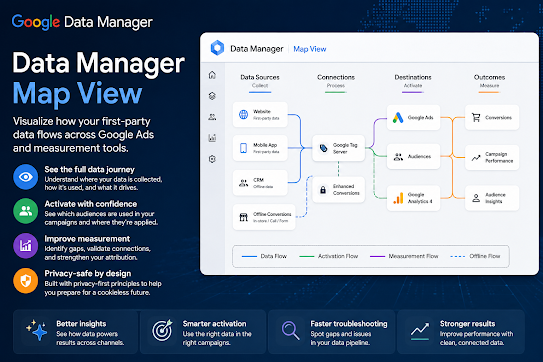
    Google is pushing deeper into privacy-safe advertising infrastructure with the introduction of Data Manager Map View, a new visualization layer designed to help advertisers and publishers understand how first-party data flows across campaigns, platforms, and measurement systems.

    While it sounds technical, its impact is actually very practical: it gives teams a clearer “map” of how user data connects to outcomes inside Google Ads and related ecosystems.


    🧠 What Data Manager Map View actually is

    Data Manager Map View is a visualization tool inside Google’s broader Data Manager framework that shows:

    • Where first-party data is collected (CRM, website, app, offline)
    • How it is activated in campaigns
    • Which conversions or audiences it impacts
    • How data moves across Google Ads and measurement tools

    Instead of manually tracing tags, audiences, and conversion paths, users can now see the entire data pipeline visually.

    Think of it as:

    A “Google Maps” for your advertising data flow.


    🔍 Why Google built it

    This launch is part of a bigger shift in ad tech:

    1. 📉 Cookie deprecation pressure

    With third-party cookies fading, advertisers need:

    • stronger first-party data usage
    • better visibility of data quality and flow

    2. 🤖 AI-driven campaign automation

    Google’s AI systems need clean, structured data. Map View helps advertisers understand:

    • where signals are strong
    • where tracking breaks down
    • where optimization inputs are missing

    3. 📊 Measurement complexity explosion

    Between:

    • GA4
    • Google Ads
    • Google Ad Manager
    • offline conversions
    • server-side tagging

    Most advertisers struggle to understand “what connects to what.” Map View reduces that confusion.


    🚀 Key features of Data Manager Map View

    🧩 1. End-to-end data flow visualization

    Shows how data moves from:

    • website/app → Google Ads → conversions → reporting

    🎯 2. First-party data activation tracking

    You can see:

    • which audiences are being used
    • where they’re applied (search, display, YouTube, etc.)

    ⚙️ 3. Integration transparency

    Helps identify:

    • broken tags
    • missing conversion events
    • underutilized data sources

    📈 4. Measurement readiness signals

    Highlights whether your setup is:

    • fully optimized
    • partially connected
    • or missing key data inputs

    💡 Why this matters for advertisers and publishers

    For advertisers:

    • Better optimization decisions
    • Less guesswork in attribution
    • Improved ROI tracking
    • Faster troubleshooting of conversion issues

    For publishers (GAM ecosystem users):

    • More stable demand signals
    • Better audience match quality
    • Improved programmatic performance understanding

    ⚠️ The catch (what to watch out for)

    Like most Google tools, effectiveness depends on setup quality:

    • Poor tagging = misleading visualization
    • Fragmented data sources = incomplete map
    • Server-side setup still required for full accuracy

    Also, it doesn’t replace analytics tools—it complements them.


    🔮 Big picture: where this is heading

    Data Manager Map View is part of a larger trend in ad tech:

    • 🧠 AI-managed advertising systems
    • 🔐 privacy-first measurement infrastructure
    • 📊 unified data activation pipelines
    • 📉 less reliance on third-party tracking

    In short, Google is moving toward a future where:

    advertisers don’t just run campaigns—they manage data ecosystems visually and automatically.

  • How to Add Ad Units in Google Ad Manager (GAM) for Beginners

    How to Add Ad Units in Google Ad Manager (GAM) for Beginners

    How to Add Ad Units in Google Ad Manager (GAM) for Beginners

    If you’re just starting with Google Ad Manager, one of the first things you need to understand is Ad Units.

    Ad Units are the spaces on your website where ads appear. Think of them as “containers” that tell Google Ad Manager exactly where an advertisement should be displayed — like the header, sidebar, in-article section, or footer.

    Without properly created Ad Units, GAM cannot serve ads correctly.

    This beginner-friendly guide walks you through the entire process step by step.


    What Are Ad Units in Google Ad Manager?

    An Ad Unit is a defined ad placement inside your website or app.

    Examples include:

    • Homepage banner
    • Sidebar rectangle
    • Sticky footer ad
    • In-article ad
    • Mobile anchor ad

    Each Ad Unit has:

    • A unique name
    • A unique code
    • Supported ad sizes
    • Targeting settings

    These are later connected to:

    • Line items
    • Orders
    • AdSense or Ad Exchange demand
    • Header bidding partners

    Why Proper Ad Unit Setup Matters

    A clean Ad Unit structure helps with:

    • Better reporting
    • Easier troubleshooting
    • Improved targeting
    • Higher CPM optimization
    • Cleaner header bidding integration
    • Better inventory organization

    Poorly organized ad units can create confusion later when your site scales.


    Before You Start

    You need:

    • A working Google Ad Manager account
    • Access to your website code or CMS
    • Basic understanding of where ads will appear on your site

    Step-by-Step: How to Add Ad Units in GAM

    Step 1: Login to Google Ad Manager

    Go to:

    Google Ad Manager

    After logging in:

    • Open the left sidebar
    • Click Inventory
    • Select Ad Units

    Step 2: Click “New Ad Unit”

    Inside the Ad Units page:

    • Click the New Ad Unit button
    • A setup page will appear

    This is where you define your ad placement.


    Step 3: Enter Ad Unit Details

    Ad Unit Name

    Use descriptive names.

    Good examples:

    • Homepage_Top_Leaderboard
    • Article_InContent_1
    • Sidebar_Rectangle
    • Mobile_Sticky

    Avoid random names like:

    • Ad1
    • BannerTest
    • Unit123

    Ad Unit Code

    This is automatically generated but can usually be customized.

    Keep it:

    • Short
    • Clean
    • Consistent

    Example:

    homepage_top
    article_mid_1
    sidebar_300x250

    Step 4: Select Ad Sizes

    Choose the ad sizes allowed in this placement.

    Common desktop sizes:

    • 728×90
    • 300×250
    • 336×280
    • 160×600

    Common mobile sizes:

    • 320×50
    • 300×250
    • 320×100

    You can:

    • Add multiple sizes
    • Use responsive sizes
    • Enable fluid/native formats

    Example:

    300x250, 336x280

    Step 5: Configure Target Window

    You’ll usually see:

    • Top Frame
    • SafeFrame
    • Friendly iframe

    For beginners, the default setting is generally fine.


    Step 6: Save the Ad Unit

    Click:

    Save

    Your new Ad Unit is now created.


    How to Generate the GAM Ad Tag

    After saving:

    1. Select the Ad Unit
    2. Click Generate Tags
    3. Choose:
      • Google Publisher Tag (GPT)
      • Single Request Architecture (recommended)

    GAM will generate JavaScript code.

    Example:

    <div id='div-gpt-ad-123456'></div>
    <script>
    googletag.display('div-gpt-ad-123456');
    </script>

    You’ll place this code on your website where you want ads to appear.


    Recommended Ad Unit Naming Structure

    As your site grows, organization becomes important.

    A good format is:

    Site_Section_Position_Size

    Example:

    Blog_Header_728x90
    Article_Mid_300x250
    Mobile_Footer_320x50

    This makes reporting much easier later.


    Best Practices for Beginners

    1. Keep Naming Consistent

    Consistency prevents confusion when managing hundreds of placements later.


    2. Avoid Too Many Sizes

    Too many ad sizes can:

    • Slow auctions
    • Reduce bid competition
    • Cause layout shifts

    Stick to high-performing standard sizes first.


    3. Separate Desktop and Mobile

    Desktop and mobile behavior are very different.

    Create dedicated units like:

    Desktop_Top
    Mobile_Top

    instead of mixing everything together.


    4. Use Responsive Design Carefully

    Responsive ads are useful, but incorrect implementation can break layouts.

    Test thoroughly on:

    • Desktop
    • Tablet
    • Mobile

    5. Plan for Future Growth

    Even if your site is small now, structure inventory properly from the start.

    This becomes critical when adding:

    Direct campaigns

    Ad Exchange

    Open Bidding

    Header bidding