Tag: publisher revenue

  • 5 Google Ad Manager Mistakes That Are Killing Publisher Revenue (And How to Fix Them)

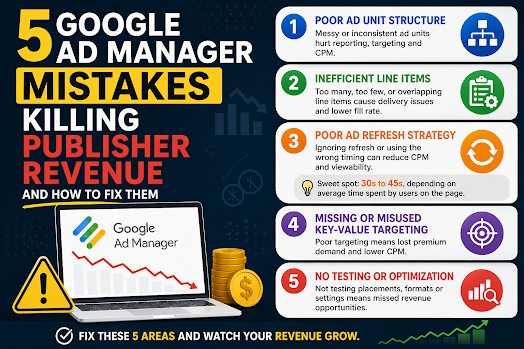
    5 Google Ad Manager Mistakes That Are Killing Publisher Revenue (And How to Fix Them)

    5 Google Ad Manager Mistakes That Are Killing Publisher Revenue (And How to Fix Them)

    Many publishers assume low ad revenue is caused by traffic drops or weak SEO.

    But in reality, most revenue loss comes from poor Google Ad Manager (GAM) configuration and optimization mistakes that quietly reduce performance.

    Even experienced publishers overlook these issues.

    In this guide, we’ll break down the 5 most common GAM mistakes that hurt publisher revenue and how to fix them using real-world ad operations logic.


    1. Poor Google Ad Manager Ad Unit Structure

    One of the most common Google Ad Manager mistakes is a messy or inconsistent ad unit structure.

    Many publishers create ad units like:

    • homepage_banner_1
    • sidebar_ads
    • mobile_ad_random123

    While this may seem harmless, it creates serious scaling issues.

    Why this hurts publisher revenue:

    • weak inventory segmentation
    • poor reporting accuracy
    • inefficient programmatic targeting
    • reduced buyer understanding of inventory

    SEO & monetization impact:

    A poorly structured GAM setup reduces demand competition, which directly lowers CPM and overall revenue.

    Fix:

    Use a structured naming system:

    Format:
    site_section_placement_device

    Example:
    news_home_top_leaderboard_desktop

    This improves:

    • reporting clarity
    • targeting precision
    • ad demand optimization

    2. Inefficient Line Item Configuration in GAM

    Another major Google Ad Manager mistake is improper line item setup.

    Publishers often:

    • create too many overlapping line items
    • or rely on a single demand source

    Why this reduces revenue:

    • internal competition confusion
    • inefficient ad delivery prioritization
    • loss of high-value impressions

    Result:

    GAM cannot properly allocate impressions, leading to lower yield.

    Fix:

    • separate direct and programmatic demand clearly
    • avoid redundant line items
    • define clear priority hierarchy in GAM

    A clean structure improves:

    • fill rate
    • CPM stability
    • demand competition efficiency

    3. Poor Ad Refresh Strategy in Google Ad Manager

    Ad refresh is one of the most misunderstood GAM optimization tools.

    Many publishers either:

    • don’t use ad refresh at all
    • or implement overly aggressive refresh cycles

    Why this hurts revenue:

    • aggressive refresh lowers CPM (buyers devalue impressions)
    • no refresh misses long-session monetization opportunities
    • poor timing reduces viewability performance

    Best practice ad refresh strategy:

    The optimal approach is to balance refresh timing based on user engagement and page behavior.

    A practical ad refresh range is 30 to 45 seconds, depending on average time spent on page and viewability conditions.

    However, this is not a fixed rule.

    Better optimization approach:

    • Use longer refresh intervals for short-session pages
    • Apply 30–45s refresh only for high engagement content
    • Prioritize viewable refresh triggers over timer-based refresh alone

    This ensures:

    • higher CPM stability
    • better user experience
    • improved ad viewability scores

    4. Missing or Misused Key-Value Targeting in GAM

    Key-values are a powerful but often underused feature in Google Ad Manager.

    Common mistakes include:

    • not using key-values at all
    • overcomplicating setup
    • not aligning with demand partners

    Why this reduces revenue:

    Without proper segmentation, publishers lose:

    • audience targeting precision
    • premium demand access
    • higher CPM opportunities

    Fix:

    Start with simple key-values:

    • device type (mobile / desktop)
    • content category
    • geographic region

    Then expand only when necessary.

    Proper key-value usage improves:

    • programmatic targeting
    • demand matching efficiency
    • revenue per impression

    5. No Testing or Optimization Strategy in GAM

    Many publishers treat Google Ad Manager as a “set and forget” system.

    This is a major revenue killer.

    Without testing, you miss:

    • optimal ad placements
    • best-performing formats
    • highest RPM configurations

    Even small changes can significantly impact revenue.

    Examples of high-impact tests:

    • ad placement position changes
    • refresh timing adjustments
    • layout density optimization
    • format mix comparison

    Fix:

    Treat GAM as a continuous optimization system:

    • run placement tests
    • monitor RPM changes
    • track viewability performance
    • adjust based on data, not assumptions

    📊 Final Thoughts: Why Publishers Lose Revenue in GAM

    Most publishers don’t lose revenue because of traffic issues.

    They lose revenue because of:

    • poor GAM structure
    • inefficient setup
    • lack of optimization strategy

    The good news is that these are fully fixable without increasing traffic.

    In many cases, proper Google Ad Manager optimization alone can significantly increase:

    CPM stability

    RPM (Revenue per Mille)

    fill rate

  • How Programmatic Really Decides Your Earnings

    How Programmatic Really Decides Your Earnings

    How Programmatic Really Decides Your Earnings

    Discover how programmatic ads actually determine your revenue. Learn key factors like viewability, demand, ad refresh, and optimization strategies.

    What Is Programmatic Advertising?

    Programmatic advertising is the automated buying and selling of ad inventory using real-time auctions. Instead of manual deals, advertisers bid on your ad space through platforms like Google Ad Manager.

    Each time a user loads your page, an auction happens instantly—and the highest qualified bid wins.


    The Key Factors That Decide Your Earnings

    1. User Quality (Geo + Intent)

    Not all traffic is equal.

    Advertisers pay more for users who are:

    • From high-value countries (US, UK, CA, AU)
    • Likely to convert (buyers vs browsers)
    • Returning visitors with behavioral data

    👉 A US visitor can be worth 5–10x more than traffic from lower CPM regions.


    2. Demand Density (Advertiser Competition)

    Your earnings increase when more advertisers are competing for your inventory.

    Factors that increase demand:

    • Niche content (finance, tech, health = high CPM)
    • Seasonal spikes (Q4 = highest demand)
    • Strong audience targeting

    Low competition = lower bids = lower revenue.


    3. Viewability (The Silent Revenue Killer)

    If ads aren’t seen, they aren’t valuable.

    Most advertisers optimize for:

    • 50% of the ad visible for at least 1 second (display)
    • Higher viewability = higher CPM bids

    👉 Ads below the fold or poorly placed will significantly reduce earnings.


    4. Ad Refresh Strategy

    Refreshing ads can boost revenue—but only if done correctly.

    Best practice:

    • Refresh ads every 30–45 seconds
    • Base timing on average session duration
    • Avoid aggressive refresh (can reduce bid quality)

    👉 Smart refresh = more impressions without hurting user experience.


    5. Floor Prices (Pricing Control)

    Floor prices set the minimum bid advertisers must meet.

    • Too high → fewer bids (unsold inventory)
    • Too low → undervalued impressions

    👉 The goal is dynamic floors that adjust based on demand.


    6. Latency (Speed Matters More Than You Think)

    Slow pages kill revenue.

    Why?

    • Auctions timeout
    • Bidders drop off
    • Fewer bids = lower CPM

    👉 A delay of even 1 second can reduce revenue significantly.


    7. Ad Layout & Density

    Where and how many ads you place matters.

    • Above-the-fold placements = highest value
    • Sticky ads perform well
    • Too many ads = lower user experience + lower bids

    👉 Balance is key: optimize for both UX and revenue.


    8. Auction Type (First-Price vs Second-Price)

    Most exchanges now use first-price auctions, meaning:

    • Advertisers pay what they bid

    This increases competition—but also makes bid strategies more complex.

    👉 Better setup = smarter bids = higher earnings.


    The Real Truth About Programmatic Revenue

    Programmatic doesn’t “decide” your earnings randomly.

    It’s driven by:

    • Your audience quality
    • Your technical setup
    • Your optimization strategy

    Two sites with the same traffic can earn very different revenue—because one understands these levers, and the other doesn’t.


    How to Maximize Your Earnings

    Here’s a quick action checklist:

    • Improve traffic quality (focus on high-value geos)
    • Optimize ad placements for viewability
    • Use smart ad refresh (30–45 seconds sweet spot)
    • Reduce page load time and latency
    • Test floor pricing strategies
    • Monitor bidder competition

  • Google’s Data Manager Map View: A New Era of First-Party Data Visibility in Ad Tech

    Google’s Data Manager Map View: A New Era of First-Party Data Visibility in Ad Tech

    📊 Google’s Data Manager Map View: A New Era of First-Party Data Visibility in Ad Tech

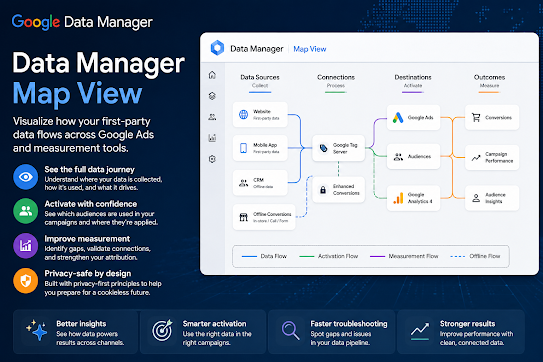
    Google is pushing deeper into privacy-safe advertising infrastructure with the introduction of Data Manager Map View, a new visualization layer designed to help advertisers and publishers understand how first-party data flows across campaigns, platforms, and measurement systems.

    While it sounds technical, its impact is actually very practical: it gives teams a clearer “map” of how user data connects to outcomes inside Google Ads and related ecosystems.


    🧠 What Data Manager Map View actually is

    Data Manager Map View is a visualization tool inside Google’s broader Data Manager framework that shows:

    • Where first-party data is collected (CRM, website, app, offline)
    • How it is activated in campaigns
    • Which conversions or audiences it impacts
    • How data moves across Google Ads and measurement tools

    Instead of manually tracing tags, audiences, and conversion paths, users can now see the entire data pipeline visually.

    Think of it as:

    A “Google Maps” for your advertising data flow.


    🔍 Why Google built it

    This launch is part of a bigger shift in ad tech:

    1. 📉 Cookie deprecation pressure

    With third-party cookies fading, advertisers need:

    • stronger first-party data usage
    • better visibility of data quality and flow

    2. 🤖 AI-driven campaign automation

    Google’s AI systems need clean, structured data. Map View helps advertisers understand:

    • where signals are strong
    • where tracking breaks down
    • where optimization inputs are missing

    3. 📊 Measurement complexity explosion

    Between:

    • GA4
    • Google Ads
    • Google Ad Manager
    • offline conversions
    • server-side tagging

    Most advertisers struggle to understand “what connects to what.” Map View reduces that confusion.


    🚀 Key features of Data Manager Map View

    🧩 1. End-to-end data flow visualization

    Shows how data moves from:

    • website/app → Google Ads → conversions → reporting

    🎯 2. First-party data activation tracking

    You can see:

    • which audiences are being used
    • where they’re applied (search, display, YouTube, etc.)

    ⚙️ 3. Integration transparency

    Helps identify:

    • broken tags
    • missing conversion events
    • underutilized data sources

    📈 4. Measurement readiness signals

    Highlights whether your setup is:

    • fully optimized
    • partially connected
    • or missing key data inputs

    💡 Why this matters for advertisers and publishers

    For advertisers:

    • Better optimization decisions
    • Less guesswork in attribution
    • Improved ROI tracking
    • Faster troubleshooting of conversion issues

    For publishers (GAM ecosystem users):

    • More stable demand signals
    • Better audience match quality
    • Improved programmatic performance understanding

    ⚠️ The catch (what to watch out for)

    Like most Google tools, effectiveness depends on setup quality:

    • Poor tagging = misleading visualization
    • Fragmented data sources = incomplete map
    • Server-side setup still required for full accuracy

    Also, it doesn’t replace analytics tools—it complements them.


    🔮 Big picture: where this is heading

    Data Manager Map View is part of a larger trend in ad tech:

    • 🧠 AI-managed advertising systems
    • 🔐 privacy-first measurement infrastructure
    • 📊 unified data activation pipelines
    • 📉 less reliance on third-party tracking

    In short, Google is moving toward a future where:

    advertisers don’t just run campaigns—they manage data ecosystems visually and automatically.