Tag: SEO

  • The Shift from SEO to GEO (Generative Engine Optimization)

    The Shift from SEO to GEO (Generative Engine Optimization)

    The Shift from SEO to GEO (Generative Engine Optimization)

    For more than two decades, Search Engine Optimization (SEO) defined digital visibility. The objective was clear: rank on the first page and capture clicks from the familiar “ten blue links.”

    That era is fading.

    As we move deeper into 2026, a fundamental shift is underway—one that’s redefining how users discover information and how brands earn attention. The focus is no longer just on search engines. It’s on Generative Engine Optimization (GEO).

    With AI systems like ChatGPT, Gemini, and Claude becoming the primary interface for information discovery, the battleground has moved from search result pages to AI-generated answers, summaries, and citations.


    What is GEO?

    Generative Engine Optimization (GEO) is the practice of structuring and positioning content so it can be understood, synthesized, and cited by large language models (LLMs).

    Where SEO optimizes for ranking algorithms, GEO optimizes for response engines.

    It’s not about being one of ten links—it’s about being the source behind the answer.


    The Core Pillars of GEO

    1. Citation Authority
    Your goal is to become the source AI systems trust and reference. If your content is consistently cited, your brand becomes part of the answer itself.

    2. Semantic Depth
    Keywords are no longer enough. GEO prioritizes topic completeness—content that fully explains a subject through structured, interconnected ideas that AI can easily interpret.

    3. Information Density
    AI favors clarity and efficiency. High-value, fact-rich, and concise content outperforms long, unfocused writing. Every sentence should earn its place.


    Why This Shift Is Happening Now

    The Rise of Zero-Click Behavior
    Users increasingly get answers directly from AI summaries, skipping traditional search results entirely. The click is no longer guaranteed.

    Volatility in Organic Traffic
    The classic search landscape is becoming unstable. AI-generated overviews now dominate above-the-fold space, pushing traditional listings further down and reducing CTR.

    The Evolution of Search Behavior
    Search is no longer fragmented—it’s conversational. Users ask layered, intent-rich questions, and expect precise, contextual answers. GEO ensures your content is what AI selects in these moments.

    A Massive Opportunity Gap
    A relatively small portion of AI citations currently comes from major publishers. This opens the door for niche experts, independent creators, and specialized brands to establish authority—if they produce structured, high-quality information.


    Strategic Priorities for Marketers

    To stay competitive, the goal must shift from ranking pages to powering answers.

    1. Prioritize Structure Over Style
    Clear formatting wins. Use headings, bullet points, and schema markup to make your content easy for AI to parse and extract. If your key insights are easy to identify, they’re more likely to be cited.

    2. Create Citation-Ready Content
    Original insights are your strongest asset. Proprietary data, research, case studies, and expert perspectives dramatically increase your chances of being referenced by AI systems.

    3. Expand Your Brand Footprint
    GEO extends beyond your website. Mentions across forums, communities, and reputable publications reinforce credibility. The broader your presence, the stronger your “trust signal” to AI models.


    The Future: Beyond the Click

    In the GEO era, success isn’t defined solely by traffic—it’s defined by influence within the answer layer.

    Even without a click, being cited as the trusted source builds authority, recall, and long-term brand equity in ways traditional metrics can’t fully capture.


    Final Thought

    The transition from SEO to GEO isn’t just tactical—it’s philosophical.

    It’s no longer enough to be discoverable.

  • How to Improve Ad Viewability on Websites

    How to Improve Ad Viewability on Websites

    In digital advertising, traffic alone is no longer enough. One of the biggest factors that directly impacts ad revenue today is ad viewability — a metric that measures whether users actually see the ads displayed on your website.

    A page can generate thousands of impressions, but if users never scroll far enough to see the ads, advertisers may pay less or stop bidding aggressively altogether.

    For publishers using platforms like Google Ad Manager or programmatic demand sources, improving viewability can significantly increase CPMs, advertiser trust, and long-term revenue performance.

    What Is Ad Viewability?

    According to industry standards from the Interactive Advertising Bureau (IAB), a display ad is considered viewable when:

    • At least 50% of the ad is visible on screen
    • For at least 1 continuous second

    For video ads, the requirement is typically:

    • 50% visible for at least 2 continuous seconds

    This means an ad loaded somewhere far below the fold may count as an impression, but not necessarily as a viewable impression.

    Why Viewability Matters

    Higher viewability usually leads to:

    • Better CPMs
    • Increased advertiser demand
    • Improved bidding competition
    • Higher Active View rates in GAM
    • Better user engagement
    • Stronger long-term monetization

    Many advertisers now optimize campaigns specifically around viewable inventory instead of raw impressions.


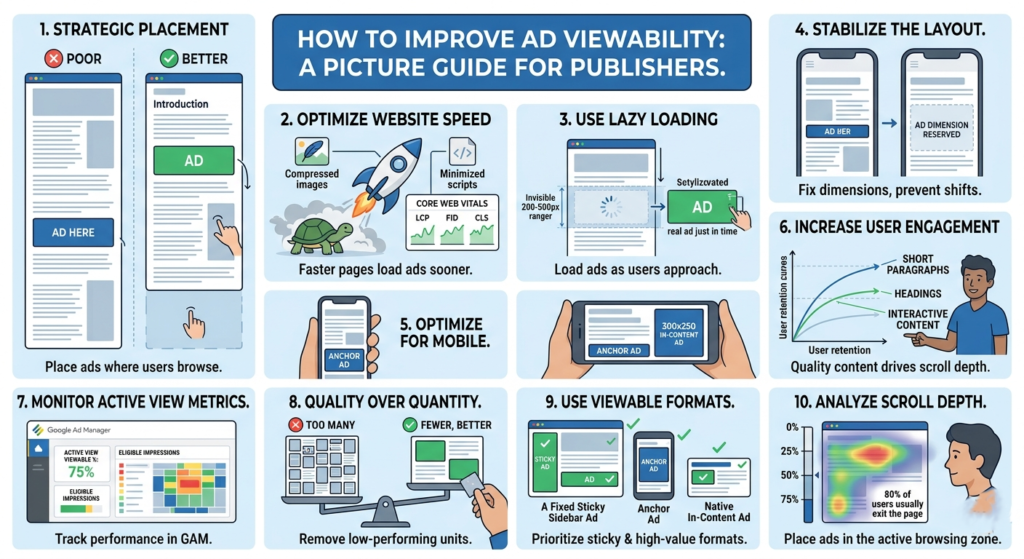
    1. Place Ads Above the Fold Carefully

    “Above the fold” refers to the section visible before users scroll.

    Ads placed too low on the page often suffer from poor viewability because visitors leave before reaching them.

    Good placements include:

    • Below the article title
    • Within the content after a few paragraphs
    • Sticky sidebar ads on desktop
    • Anchor ads on mobile

    Avoid stuffing too many ads at the very top. Excessive ad density can hurt user experience and increase bounce rate.

    Example of Better Placement

    Poor Placement

    • Ad appears after 1,500 words
    • Most users never reach it

    Better Placement

    • Ad appears after the introduction
    • Higher chance users actually see it

    2. Improve Website Speed

    Slow-loading websites reduce viewability because ads may load after users already scroll away.

    Focus on:

    • Compressing images
    • Using lazy loading
    • Reducing unnecessary scripts
    • Optimizing Core Web Vitals
    • Using lightweight themes

    A faster website gives ads more time to render while users are still viewing the page.

    Key Performance Areas

    • Largest Contentful Paint (LCP)
    • Interaction to Next Paint (INP)
    • Cumulative Layout Shift (CLS)

    These metrics also influence user retention and SEO performance.


    3. Use Lazy Loading for Ads

    Lazy loading delays ad requests until users approach the ad slot.

    Benefits include:

    • Faster initial page load
    • Better viewability
    • Reduced wasted impressions
    • Improved Active View metrics

    However, aggressive lazy loading can backfire if ads load too late. Balance is important.

    Many publishers configure ads to load when users are around 200–500px away from the slot.


    4. Reduce Layout Shifts

    If content jumps while loading, users may scroll unexpectedly past ads.

    This creates:

    • Poor user experience
    • Lower engagement
    • Reduced viewability

    Reserve fixed dimensions for:

    • Ad containers
    • Images
    • Embedded videos

    This helps stabilize the page while content loads.


    5. Optimize Mobile Experience

    Most website traffic today comes from mobile devices.

    Mobile-specific issues affecting viewability include:

    • Oversized ads
    • Slow mobile speed
    • Excessive sticky elements
    • Poor spacing
    • Intrusive popups

    Use responsive ad units and test placements across different screen sizes.

    Recommended Mobile Ad Sizes

    Common high-performing sizes include:

    • 320×50
    • 300×250
    • 320×100

    6. Increase User Engagement

    Users who stay longer on your site naturally view more ads.

    Ways to improve engagement:

    • Better article formatting
    • Strong introductions
    • Internal linking
    • Faster pages
    • Useful content
    • Cleaner design

    High bounce rates often correlate with lower viewability.

    Content Structure Tips

    • Use short paragraphs
    • Add headings regularly
    • Include images
    • Avoid large walls of text

    Good readability improves scroll depth.


    7. Monitor Active View Metrics in GAM

    If you use Google Ad Manager, monitor metrics such as:

    • Active View Viewable %
    • Active View Eligible Impressions
    • Measurable Impressions

    These reports help identify poorly performing placements.

    Low-performing ad units can then be:

    • Repositioned
    • Removed
    • Re-sized
    • Replaced with higher-performing formats

    8. Avoid Too Many Ads Per Page

    More ads do not always mean more revenue.

    Adding too many ad units can:

    • Slow the site
    • Lower viewability
    • Reduce competition
    • Hurt user trust

    Sometimes removing low-performing units actually increases overall RPM.

    Quality inventory generally performs better than excessive inventory.


    9. Test Different Ad Formats

    Some formats naturally achieve higher viewability.

    Examples:

    • Sticky sidebar ads
    • Anchor ads
    • In-content ads
    • Multiplex/native ads

    Formats that remain on screen longer tend to improve advertiser value.

    Always balance monetization with usability.


    10. Analyze Scroll Depth

    Understanding how far users scroll helps optimize ad placement.

    If most visitors only reach 40% of an article:

    • Ads below that point may never become viewable

    Use analytics tools to study:

    • Scroll behavior
    • Session duration
    • Exit points

    Then position ads where users are most active.