Tag: User Experience

  • Checking Site’s Core Web Vitals

    Checking Site’s Core Web Vitals

    Checking a website’s Core Web Vitals is essential for assessing its performance and user experience. Core Web Vitals focus on three main aspects: loading performance, interactivity, and visual stability.Here are several methods to check your site’s Core Web Vitals:

    1. Google PageSpeed Insights

    • Access the Tool: Go to PageSpeed Insights.
    • Enter URL: Type in the URL of the website you want to analyze.
    • Run Analysis: Click the “Analyze” button.
    • Review Results: The tool will provide a score for mobile and desktop performance, along with specific metrics for:
      • Largest Contentful Paint (LCP): Measures loading performance.
      • First Input Delay (FID): Measures interactivity.
      • Cumulative Layout Shift (CLS): Measures visual stability.

    2. Google Search Console

    • Access Google Search Console: Log into your Google Search Console account.
    • Select Your Property: Choose the website you want to analyze.
    • Navigate to Core Web Vitals: In the left sidebar, click on “Core Web Vitals” under the “Experience” section.
    • Review Report: You’ll see a report that shows how your site performs based on real user data, categorizing pages as “Good,” “Needs Improvement,” or “Poor.”

    3. Lighthouse

    • Open Chrome DevTools: Right-click on your website and select Inspect or press Ctrl + Shift + I (Windows) or Command + Option + I (Mac).
    • Navigate to Lighthouse: Click on the Lighthouse tab in the DevTools panel.
    • Generate Report: Select the options for mobile or desktop and click the “Generate Report” button.
    • Analyze Results: The report will include Core Web Vitals metrics along with recommendations for improvement.

    4. Web Vitals Chrome Extension

    • Install the Extension: Go to the Chrome Web Store and search for Web Vitals. Install the extension.
    • Run the Extension: After installation, click the extension icon while visiting your website.
    • View Metrics: The extension will display real-time metrics for LCP, FID, and CLS directly in your browser.

    5. GTmetrix

    • Access GTmetrix: Go to GTmetrix.
    • Enter URL: Type in the website URL you want to check.
    • Run the Analysis: Click the “Test your site” button.
    • Review Results: The report will provide a performance score along with recommendations, including Core Web Vitals metrics.

    6. WebPageTest

    • Access WebPageTest: Go to WebPageTest.
    • Enter URL: Input the URL of your website.
    • Select Test Options: Choose a location and browser, then click “Start Test.”
    • Analyze Results: Once the test completes, you’ll see detailed metrics, including Core Web Vitals.

    Final Steps

    After analyzing your Core Web Vitals, review the provided recommendations for improvement. Focus on optimizing loading times, enhancing interactivity, and ensuring a stable layout to enhance user experience and improve search rankings.

  • What is Google Core Web Vitals ?

    What is Google Core Web Vitals ?

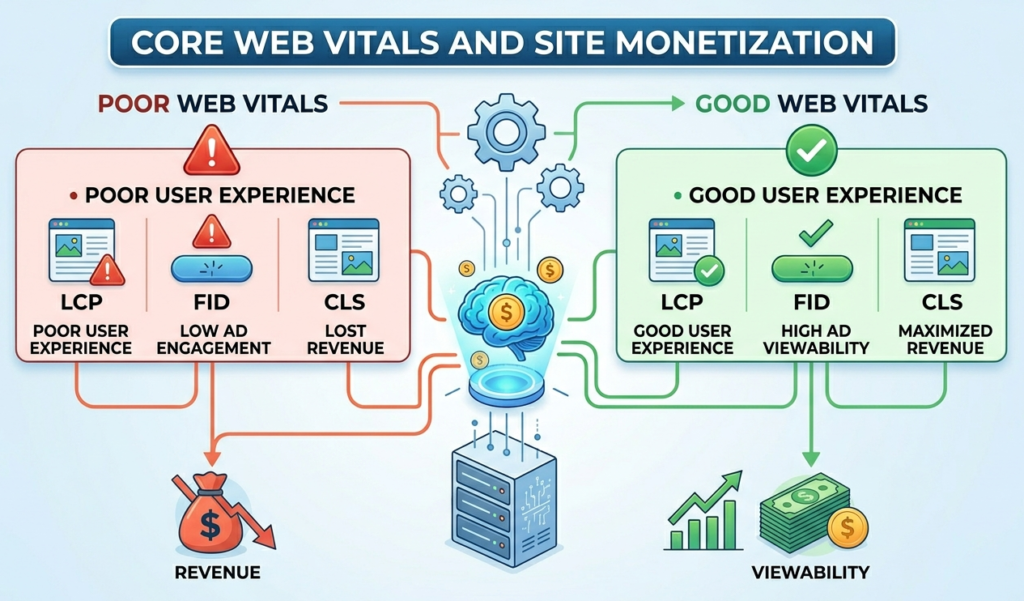
    Google Core Web Vitals are a set of specific factors that Google considers important for delivering a good user experience on the web. These metrics focus on three key aspects of page performance:

    Basic Core Web Vitals Metrics:

    Goal: A CLS score of 0.1 or less is considered good.

    Largest Contentful Paint (LCP):

    Definition: Measures loading performance. It marks the point in the page load timeline when the largest text block or image is rendered on the screen.

    Goal: An LCP of 2.5 seconds or faster is considered good.

    First Input Delay (FID):

    Definition: Measures interactivity. It quantifies the time it takes for a user to interact with a page (e.g., clicking a link or button) until the browser responds.

    Goal: An FID of 100 milliseconds or less is considered good.

    Cumulative Layout Shift (CLS):

    Definition: Measures visual stability. It assesses how much the page layout shifts during the loading process, which can lead to poor user experience.

  • How Core Web Vitals Affect Site Monetization?

    How Core Web Vitals Affect Site Monetization?

    To enhance your website’s monetization potential, it’s essential to monitor and optimize your Core Web Vitals. By ensuring your site loads quickly, responds to user interactions promptly, and maintains visual stability, you can improve user experience, increase traffic, and ultimately boost your revenue from ads.

    Sites that prioritize and optimize for Core Web Vitals may gain a competitive advantage over others in the same niche. A better user experience can lead to increased user loyalty, return visits, and improved conversion rates.

    Impact on SEO Rankings:

    Google uses Core Web Vitals as a ranking factor in its search algorithm. Websites that provide a better user experience through improved Core Web Vitals are more likely to rank higher in search results. Higher visibility can lead to increased traffic and potentially higher ad revenue.

    User Experience:

    Poor Core Web Vitals can lead to a frustrating user experience, causing visitors to leave the site quickly (higher bounce rates). This can negatively impact ad impressions and engagement, which in turn can lower monetization potential.

    Ad Revenue:

    Ad networks, including Google AdSense, may prioritize or recommend websites with good performance metrics. Sites with poor Core Web Vitals may face lower CPM (cost per thousand impressions) rates due to decreased user engagement and higher bounce rates.

    Compliance with Standards:

    Many advertising partners and networks now consider Core Web Vitals when approving websites for monetization. Websites that do not meet the minimum performance thresholds may struggle to get approved or may face restrictions in their ad serving capabilities.

    Competitive Advantage:

    Sites that prioritize and optimize for Core Web Vitals may gain a competitive advantage over others in the same niche. A better user experience can lead to increased user loyalty, return visits, and improved conversion rate

  • How to Improve Ad Viewability on Websites

    How to Improve Ad Viewability on Websites

    In digital advertising, traffic alone is no longer enough. One of the biggest factors that directly impacts ad revenue today is ad viewability — a metric that measures whether users actually see the ads displayed on your website.

    A page can generate thousands of impressions, but if users never scroll far enough to see the ads, advertisers may pay less or stop bidding aggressively altogether.

    For publishers using platforms like Google Ad Manager or programmatic demand sources, improving viewability can significantly increase CPMs, advertiser trust, and long-term revenue performance.

    What Is Ad Viewability?

    According to industry standards from the Interactive Advertising Bureau (IAB), a display ad is considered viewable when:

    • At least 50% of the ad is visible on screen
    • For at least 1 continuous second

    For video ads, the requirement is typically:

    • 50% visible for at least 2 continuous seconds

    This means an ad loaded somewhere far below the fold may count as an impression, but not necessarily as a viewable impression.

    Why Viewability Matters

    Higher viewability usually leads to:

    • Better CPMs
    • Increased advertiser demand
    • Improved bidding competition
    • Higher Active View rates in GAM
    • Better user engagement
    • Stronger long-term monetization

    Many advertisers now optimize campaigns specifically around viewable inventory instead of raw impressions.


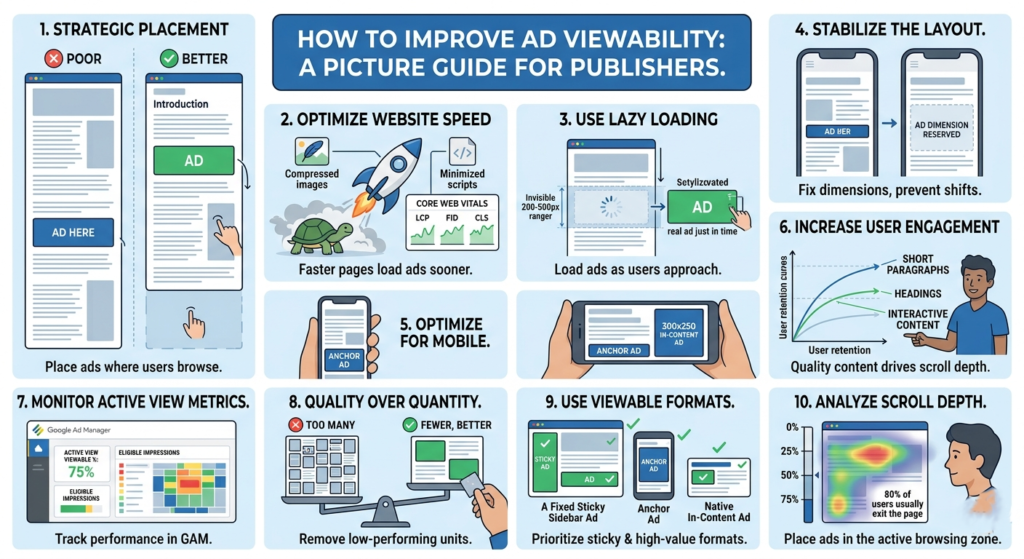
    1. Place Ads Above the Fold Carefully

    “Above the fold” refers to the section visible before users scroll.

    Ads placed too low on the page often suffer from poor viewability because visitors leave before reaching them.

    Good placements include:

    • Below the article title
    • Within the content after a few paragraphs
    • Sticky sidebar ads on desktop
    • Anchor ads on mobile

    Avoid stuffing too many ads at the very top. Excessive ad density can hurt user experience and increase bounce rate.

    Example of Better Placement

    Poor Placement

    • Ad appears after 1,500 words
    • Most users never reach it

    Better Placement

    • Ad appears after the introduction
    • Higher chance users actually see it

    2. Improve Website Speed

    Slow-loading websites reduce viewability because ads may load after users already scroll away.

    Focus on:

    • Compressing images
    • Using lazy loading
    • Reducing unnecessary scripts
    • Optimizing Core Web Vitals
    • Using lightweight themes

    A faster website gives ads more time to render while users are still viewing the page.

    Key Performance Areas

    • Largest Contentful Paint (LCP)
    • Interaction to Next Paint (INP)
    • Cumulative Layout Shift (CLS)

    These metrics also influence user retention and SEO performance.


    3. Use Lazy Loading for Ads

    Lazy loading delays ad requests until users approach the ad slot.

    Benefits include:

    • Faster initial page load
    • Better viewability
    • Reduced wasted impressions
    • Improved Active View metrics

    However, aggressive lazy loading can backfire if ads load too late. Balance is important.

    Many publishers configure ads to load when users are around 200–500px away from the slot.


    4. Reduce Layout Shifts

    If content jumps while loading, users may scroll unexpectedly past ads.

    This creates:

    • Poor user experience
    • Lower engagement
    • Reduced viewability

    Reserve fixed dimensions for:

    • Ad containers
    • Images
    • Embedded videos

    This helps stabilize the page while content loads.


    5. Optimize Mobile Experience

    Most website traffic today comes from mobile devices.

    Mobile-specific issues affecting viewability include:

    • Oversized ads
    • Slow mobile speed
    • Excessive sticky elements
    • Poor spacing
    • Intrusive popups

    Use responsive ad units and test placements across different screen sizes.

    Recommended Mobile Ad Sizes

    Common high-performing sizes include:

    • 320×50
    • 300×250
    • 320×100

    6. Increase User Engagement

    Users who stay longer on your site naturally view more ads.

    Ways to improve engagement:

    • Better article formatting
    • Strong introductions
    • Internal linking
    • Faster pages
    • Useful content
    • Cleaner design

    High bounce rates often correlate with lower viewability.

    Content Structure Tips

    • Use short paragraphs
    • Add headings regularly
    • Include images
    • Avoid large walls of text

    Good readability improves scroll depth.


    7. Monitor Active View Metrics in GAM

    If you use Google Ad Manager, monitor metrics such as:

    • Active View Viewable %
    • Active View Eligible Impressions
    • Measurable Impressions

    These reports help identify poorly performing placements.

    Low-performing ad units can then be:

    • Repositioned
    • Removed
    • Re-sized
    • Replaced with higher-performing formats

    8. Avoid Too Many Ads Per Page

    More ads do not always mean more revenue.

    Adding too many ad units can:

    • Slow the site
    • Lower viewability
    • Reduce competition
    • Hurt user trust

    Sometimes removing low-performing units actually increases overall RPM.

    Quality inventory generally performs better than excessive inventory.


    9. Test Different Ad Formats

    Some formats naturally achieve higher viewability.

    Examples:

    • Sticky sidebar ads
    • Anchor ads
    • In-content ads
    • Multiplex/native ads

    Formats that remain on screen longer tend to improve advertiser value.

    Always balance monetization with usability.


    10. Analyze Scroll Depth

    Understanding how far users scroll helps optimize ad placement.

    If most visitors only reach 40% of an article:

    • Ads below that point may never become viewable

    Use analytics tools to study:

    • Scroll behavior
    • Session duration
    • Exit points

    Then position ads where users are most active.