
Author: Squee

  • The New Default: Navigating Privacy-First and

    The New Default: Navigating Privacy-First and

    Privacy-first and cookieless targeting has officially crossed the threshold from a “future trend” to the default operating model of digital advertising. What began years ago as a compliance-driven scramble to meet regulatory requirements has matured into a total structural shift. Today, how the industry discovers, identifies, and reaches audiences has been fundamentally re-engineered.

    At the epicenter of this transformation is the final collapse of third-party cookie dependency. For decades, cookies served as the bedrock for cross-site tracking and audience targeting at scale. However, with major browser restrictions fully solidified and global privacy regulations expanding in scope and enforcement, that foundation has eroded entirely.

    In its place, a sophisticated new ad tech stack has emerged—built on the three pillars of first-party data, consented identity resolution, and AI-driven contextual intelligence.

    First-Party Data Becomes the New Targeting Core

    Brands, publishers, and platforms are aggressively prioritizing data collected directly from users with explicit consent. This includes:

    • Verified user logins and subscriptions
    • Direct purchase histories
    • First-party app behavior
    • On-site engagement and zero-party data (declared preferences)

    While this shift gives advertisers deeper control and higher data reliability, it has radically altered the power dynamics of the digital ecosystem. Instead of buying access to external, outsourced tracking signals, companies must now earn and sustain meaningful, direct relationships with their audiences.

    Walled gardens and major platforms like Google and Meta have locked in this direction. Through privacy sandboxes, aggregated reporting APIs, and first-party measurement frameworks, they have successfully steered the industry toward a more closed, yet entirely consent-driven, advertising environment.

    Identity Solutions Replace Legacy Tracking

    As third-party cookies fade into legacy tech, identity resolution has taken over as a critical layer of ad tech infrastructure. Instead of passively tracking anonymous users across the web, modern platforms rely on sophisticated identity graphs. These graphs are built using deterministic and probabilistic modeling from:

    • Hashed emails (such as Unified ID 2.0)
    • First-party login data
    • Privacy-compliant, consented identifiers

    Industry leaders like The Trade Desk, along with major clean room providers, have invested heavily in these identity frameworks. The goal is no longer omnipresent tracking, but rather unifying user identity across multiple devices while strictly adhering to data minimization principles and user opt-in choices.

    The Intelligent Comeback of Contextual Targeting

    Without ubiquitous behavioral tracking, context has regained its throne—but with a massive technological upgrade. Modern contextual targeting goes far beyond simple keyword matching. Today’s platforms leverage advanced natural language processing (NLP), semantic analysis, and AI-driven page classification to understand true sentiment, meaning, and user intent in real time.

    This evolution makes contextual advertising incredibly accurate and highly scalable, all while bypassing the need for personal data processing. For publishers, this shift has restored intrinsic value to the content itself, turning premium editorial environments into highly monetizable targeting assets.

    DSPs and SSPs Rebuilt from the Ground Up

    Demand-side platforms (DSPs) and supply-side platforms (SSPs) are undergoing their most significant architectural overhaul since the birth of programmatic advertising. The old infrastructure—dependent on third-party cookies, unhashed device IDs, and open-exchange cross-tracking—has been replaced by privacy-safe data pipelines.

    • DSPs must now optimize campaigns using a mix of signals, applying machine learning to fill gaps left by incomplete identity data and relying on aggregated attribution models.
    • SSPs are integrating directly with first-party publisher data and utilizing privacy-preserving auction mechanics to maintain yield without exposing user-level data.

    Even retail media powerhouses, most notably Amazon Ads, have fully adapted their ecosystems. They now lead the charge in supporting clean-room environments and closed-loop measurement, mapping ad exposure directly to retail purchases without compromising user privacy.

    The Reality of Ad Targeting Moving Forward

    The digital advertising industry is no longer optimizing for perfect, individualized user tracking. Instead, it is optimizing for privacy-safe relevance.

    The 3 Pillars of Modern Ad Tech Success

    • First-Party Data Quality and Scale: Prioritizing direct-to-consumer data collection.
    • Consented Identity Solutions: Utilizing frameworks that respect user choices and regional regulations.
    • AI-Powered Contextual Intelligence: Scaling reach through deep content comprehension rather than personal tracking.

    This shift is not a temporary workaround or a passing phase; it is a permanent redesign of the commercial internet. Companies that have adapted to this default architecture are building resilient, transparent systems that foster consumer trust. Those clinging to the remnants of legacy tracking are rapidly losing both precision and reach.

    Privacy-first advertising is no longer just an alternative approach—it is the rules of the game.

  • The Biggest Quiet Power Move in Ad Tech Just Happened — And It Changes Everything

    The Biggest Quiet Power Move in Ad Tech Just Happened — And It Changes Everything

    Most people outside the ad industry won’t notice this yet. But inside ad tech? This is being called one of the most critical infrastructure deals of the decade.

    Publicis Groupe has officially agreed to acquire LiveRamp in an all-cash deal representing a $2.167 billion enterprise value ($2.546 billion equity value). As reported by Reuters, the blockbusting move marks a massive escalation in the race to control the future of data, identity, and AI-driven marketing.

    If that sounds deeply technical—it is. But the takeaway is simple:

    Whoever controls data connectivity controls modern advertising.

    🧠 Why This Deal Matters More Than It Looks

    LiveRamp isn’t just another ad tech company; it is the industry’s central nervous system for identity. It quietly enables brands to safely onboard, match, and connect customer data across 25,000+ publisher domains and 500+ technology partners.

    By absorbing LiveRamp into Publicis—one of the “Big Four” global advertising holding companies—the traditional boundaries of the industry are shifting overnight.

    By owning the plumbing, Publicis gains a staggering competitive edge:

    • Unprecedented Identity Control: Total integration of LiveRamp’s identity graph with Publicis’ existing data crown jewel, Epsilon.
    • Fuel for “Agentic Advertising”: True AI-driven marketing can’t run on generic data. It requires clean, continuous, proprietary data loops to execute and optimize campaigns autonomously.
    • The Death of Neutral Infrastructure: LiveRamp has historically acted as an independent, neutral Switzerland for data collaboration. That era is officially ending.

    ⚡ The Real Signal: The Land Grab for the AI Stack

    This isn’t just standard corporate consolidation. It is a land grab for the foundational layer of AI marketing.

    Publicis CEO Arthur Sadoun noted that the acquisition allows clients to practice “data co-creation”—the secure blending of multiple high-value data sources to build and train proprietary AI agents on top of leading large language models (LLMs). For example, a bank could now effortlessly spin up a highly compliant AI wealth management agent that securely synthesizes data from dozens of fragmented sources to target and cross-sell products flawlessly.

    This hyper-aggressive tech pivot has left competitors scrambling. The line between an “agency” that designs ads and a “tech platform” that moves data has vanished entirely.

    🧩 The 3 Major Shifts Accelerating Next

    ShiftThe Old WayThe New Reality
    1. Identity BattlegroundTracking users via third-party cookies.First-party data collaboration via secure “clean rooms.”
    2. Holding Company ROIBuying media volume to get discounts.Owning the data pipes and charging for structural infrastructure.
    3. AI Training GroundFeeding AI generic, public internet data.Feeding AI proprietary, brand-specific “co-created” data assets.

    ⚠️ The Industry Reaction is Polarized

    While Wall Street applauded the move—prompting Publicis to aggressively upgrade its financial growth targets through 2028—the broader ad tech community is anxious.

    • The Switzerland Problem: Will independent brands and rival holding companies trust LiveRamp with their first-party data now that it’s owned by a direct competitor?
    • Monopoly Fears: The sheer concentration of data power under Publicis (Epsilon + LiveRamp) creates an intimidating walled garden that few can replicate.
    • The Copycat Pressure: Heavyweights like WPP, Omnicom, and Interpublic Group (IPG) are now under immense structural pressure to buy or build an equivalent data layer before they get locked out.

    📌 The Bottom Line

    This isn’t just another multi-billion dollar tech transaction. It represents a paradigm shift in who owns the actual foundation of digital media.

    As digital advertising enters its autonomous, agent-led era, the question is no longer who can write the best ad copy or buy the cheapest media. The question is: If data is the true infrastructure of AI, who gets to control the signal layer—and who gets locked out?

  • Why Ads Don’t Show on Your Website (And How to Fix It)

    Why Ads Don’t Show on Your Website (And How to Fix It)

    If your website ads suddenly stopped appearing — or never showed up at all — you’re not alone. This is one of the most common problems publishers face, especially with platforms like Google AdSense and other ad networks.

    Sometimes the issue is simple. Other times it’s caused by policy restrictions, technical conflicts, or low-quality traffic. The good news is that most ad display issues can be fixed once you identify the root cause.

    1. Your Site Is Still Under Review

    Many ad networks manually or automatically review websites before serving ads. During this period, ad spaces will remain blank.

    • Common Signs: Ads show as empty containers, your dashboard reads “Getting ready” (common in Google AdSense), or ads appear randomly on a few pages but not others.
    • The Fix: Wait 24 to 72 hours post-approval. Keep publishing original content and avoid changing your site’s theme or critical plugins during active review windows. ( This sometimes takes 1-2 weeks specially if it’s your first time monetizing the site).

    2. Active Ad Blockers

    A massive portion of web traffic uses ad-blocking software, which strips out ad scripts before the page even finishes rendering.

    • The Impact: You see zero ads on your own device, revenue looks unusually low, and ads work fine for some visitors but fail for others.
    • How to Test: Open your site in an Incognito/Private window, temporarily disable desktop browser extensions, or test the URL on a mobile device using a standard browser. Common culprits include uBlock Origin, AdBlock Plus, and Brave Browser Shields.

    3. Broken or Incorrect Ad Code Placement

    A tiny syntax error or a bad copy-paste job during ad code installation will completely prevent ads from rendering.

    • Common Issues: Missing HTML closing tags (), dropping ad codes into unsupported sidebar widgets, or layout conflicts within your theme.
    • WordPress Specifics: Script optimization features in popular plugins frequently break ad delivery. Watch out for conflicts with:
      • Caching Plugins (e.g., WP Rocket, LiteSpeed Cache)
      • Minification Tools (combining CSS/JS)
      • Lazy-Load Plugins (delaying ad scripts until a user scrolls)
    • The Fix: Re-copy the clean code directly from your ad network dashboard. Turn off JavaScript optimization temporarily to see if the ads return.

    4. Policy Violations and Content Restrictions

    Ad networks protect their advertisers by limiting or disabling ad serving on pages that feature restricted or high-risk content.

    • High-Risk Content: Pages with copyrighted media, adult or shocking material, misleading download buttons, low-value/spammy AI-generated content, or heavy keyword stuffing.
    • The Fix: Even if your domain is fully approved, individual pages can be penalized. Check your ad network’s Policy Center regularly to clear any flagged URLs.

    5. Low Traffic or Poor Traffic Quality

    Networks prioritize advertiser budgets. If your traffic profiles look automated or low-value, ad networks will throttle your ad inventory.

    Quality over Quantity: Advertisers want human engagement. 100 highly engaged organic visitors are worth more than 10,000 automated views.

    • Avoid at all costs: Paid traffic farms, auto-refresh traffic exchanges, and click-incentive schemes.
    • The Fix: Focus on building clean, high-value traffic channels like organic Google search, natural social media shares, and returning direct readers.

    6. Privacy and Cookie Consent Plugins

    Strict privacy regulations (like GDPR and CCPA) mean that if a user rejects cookies—or if your setup is broken—ad scripts are completely blocked from initializing.

    • The Problem: If your cookie banner resets continuously or misconfigures script blocking, ads will never load for your visitors.
    • The Fix: Visit your site, manually accept the cookie prompts, and see if the ads appear. You can also use a VPN to test how your site handles consent across different global regions.

    7. Formatting Errors in Your ads.txt File

    An incorrect or missing ads.txt file signals to programmatic buyers that your ad inventory isn’t verified, causing advertiser demand to drop to zero instantly.

    • Common Mistakes: Typographical errors in your Publisher ID, duplicate entries, or missing authorized seller rows.
    • The Fix: Verify your file directly by navigating to yourdomain.com/ads.txt. Ensure the page loads publicly as plain text without redirecting or throwing formatting errors.

    8. Limited Inventory on New Domains

    Brand new websites and fresh domains face a natural “warm-up” period where ad networks evaluate the platform’s stability.

    • What Networks Evaluate: Historical site trust, content depth, user engagement metrics, and overall niche stability.
    • The Results: New sites frequently experience blank ad spaces, Public Service Announcement (PSA) ads, or exceptionally low Cost Per Mille (CPM) rates. Consistency in publishing matters far more here than constantly redesigning your layout.

    9. Aggressive Caching and CDN Conflicts

    Over-optimized site speed settings can accidentally cache the “blank” state of an ad or defer vital ad delivery scripts indefinitely.

    • Potential Causes: Features like Cloudflare Rocket Loader, HTML edge caching, and aggressive JavaScript deferral strategies.
    • The Fix: Clear your website plugin cache, flush your CDN (like Cloudflare), empty your local browser cache, and reload the page.

    10. Account-Level Ad Serving Limits

    Networks like Google AdSense frequently apply temporary ad serving limits if they detect patterns that mimic invalid click traffic.

    • Key Indicators: A sudden, steep drop in revenue overnight, highly inconsistent ad rendering, and account warning banners.
    • The Fix: This does not mean you are permanently banned. Address it by auditing your analytics for spam traffic, focusing heavily on content quality, and strictly avoiding accidental self-clicks during site development.
  • What is Programmatic advertising?

    What is Programmatic advertising?

    Programmatic advertising is the automated process of buying and selling digital ad space in real-time, using software, algorithms, and data to target specific audiences more effectively. Instead of manually negotiating with publishers to place ads on websites, programmatic systems use real-time bidding (RTB) and other automated processes to purchase ad inventory across various digital channels (websites, apps, social media, etc.).

    Key Components:

    1. Demand-Side Platforms (DSPs): Allow advertisers to buy digital ad space automatically, targeting specific audiences based on various factors (demographics, interests, behaviour
      ).
    2. Supply-Side Platforms (SSPs): Help publishers manage, sell, and optimize their available ad space through an automated auction process.
    3. Real-Time Bidding (RTB): Ads are bought and sold in real-time, typically in milliseconds, based on the value of the impressions and targeting parameters set by the advertiser.
    4. Ad Exchanges: Digital marketplaces where buyers (advertisers) and sellers (publishers) meet to trade ad inventory programmatically.
    5. Data Management Platforms (DMPs): Collect and analyze audience data to help advertisers refine their targeting strategies for more personalized ad delivery.

    Benefits of Programmatic Advertising:

    Real-Time Optimization: Advertisers can adjust campaigns on the fly based on performance data.

    Efficiency and Speed: Automates the ad-buying process, making it faster and more efficient.

    Precise Targeting: Uses data and algorithms to deliver ads to specific audiences, reducing waste and increasing relevance.

    Scalability: Advertisers can reach large audiences across multiple platforms and devices.

    Real-Time Optimization:
     Advertisers can adjust campaigns on the fly based on performance data.

  • Getting your site monetized by Google AdSense

    Getting your site monetized by Google AdSense

    Here’s a general guide to help you through the process:

    1. Create Quality Content: Ensure your website has original, high-quality content that is useful and relevant to your audience. Aim for at least 20-30 posts or pages before applying.
    2. Comply with AdSense Policies: Familiarize yourself with Google AdSense policies and guidelines. Key areas include:
      • No adult content, violence, or illegal activities.
      • No misleading information or clickbait.
      • Ensure your content is family-friendly.
    3. Design a User-Friendly Website: Make sure your website has a clean and professional design. It should be easy to navigate, with clear menus and categories. Responsive design for mobile users is crucial.
    4. Add Essential Pages: Include important pages such as:
      • About Us
      • Contact Us
      • Privacy Policy
      • Terms and Conditions
    5. Ensure Your Site is Fully Functional: Check for broken links, slow loading times, and ensure that all features work properly.
    6. Set Up a Custom Domain: If possible, use a custom domain (e.g., www.yoursite.com) instead of a free subdomain.
    7. Check Traffic Sources: Ensure that your traffic comes from legitimate sources. Avoid using paid traffic services that violate AdSense policies.
    8. Apply for AdSense: Once your site is ready, go to the AdSense website and sign up. Fill out the application form and submit your site for review.
    9. Wait for Approval: Google will review your application, which can take anywhere from a few days to a couple of weeks. You’ll receive an email with the result of your application.
    10. Implement Ad Codes: If approved, you’ll receive ad code snippets to place on your website. Make sure to follow the instructions carefully to implement ads correctly.
    11. Monitor Performance: Once ads are live, monitor your performance and compliance with AdSense policies regularly to avoid issues.

    If your application is rejected, review the feedback provided, make the necessary changes, and consider reapplying after some time.

  • How to upload ads.txt file on your WordPress site

    How to upload ads.txt file on your WordPress site

    Adding an ads.txt file is typically required to get approval to monetize your website with ad networks.

    Here’s how you can upload an ads.txt file to your WordPress site:

    Method 1: Using an FTP Client

    1. Create Your ads.txt File:
      • Open a text editor (like Notepad or TextEdit).
      • Add the required lines to the file, specifying your ad network information.
      • Save the file as ads.txt.
    2. Connect to Your Website via FTP:
      • Use an FTP client (like FileZilla or Cyberduck) to connect to your web server.
      • Enter your FTP credentials (hostname, username, password, and port).
    3. Navigate to the Root Directory:
      • Once connected, navigate to the root directory of your WordPress installation, usually called public_html or the folder named after your domain.
    4. Upload the ads.txt File:
      • Drag and drop the ads.txt file from your computer into the root directory.
    5. Verify the Upload:
      • Open your browser and enter http://yourdomain.com/ads.txt to check if the file is accessible.

    Method 2: Using a File Manager in cPanel

    1. Create Your ads.txt File:
      • Follow the same steps as above to create and save the ads.txt file.
    2. Log into Your cPanel:
      • Access your hosting account and log into cPanel.
    3. Open File Manager:
      • Find and click on the File Manager icon.
    4. Navigate to the Root Directory:
      • Locate the root directory of your WordPress site (usually public_html).
    5. Upload the ads.txt File:
      • Click on the Upload button in the File Manager.
      • Select your ads.txt file and upload it.
    6. Verify the Upload:
      • As before, check by navigating to http://yourdomain.com/ads.txt in your browser.

    Method 3: Using a Plugin

    If you prefer a more user-friendly method, you can use a plugin:

    1. Install a Plugin:
      • Go to your WordPress dashboard.
      • Navigate to Plugins > Add New.
      • Search for a plugin like Ads.txt Manager or Insert Headers and Footers.
    2. Activate the Plugin:
      • Once installed, activate the plugin.
    3. Configure the Plugin:
      • Follow the plugin instructions to upload or enter the content for your ads.txt file.
    4. Save and Verify:
      • Save the changes and verify the upload by checking http://yourdomain.com/ads.txt.

    Final Steps

    Regardless of the method you choose, always remember to verify that the ads.txt file is accessible. This is essential for ad networks to recognize and validate your site.

  • Checking Site’s Core Web Vitals

    Checking Site’s Core Web Vitals

    Checking a website’s Core Web Vitals is essential for assessing its performance and user experience. Core Web Vitals focus on three main aspects: loading performance, interactivity, and visual stability.Here are several methods to check your site’s Core Web Vitals:

    1. Google PageSpeed Insights

    • Access the Tool: Go to PageSpeed Insights.
    • Enter URL: Type in the URL of the website you want to analyze.
    • Run Analysis: Click the “Analyze” button.
    • Review Results: The tool will provide a score for mobile and desktop performance, along with specific metrics for:
      • Largest Contentful Paint (LCP): Measures loading performance.
      • First Input Delay (FID): Measures interactivity.
      • Cumulative Layout Shift (CLS): Measures visual stability.

    2. Google Search Console

    • Access Google Search Console: Log into your Google Search Console account.
    • Select Your Property: Choose the website you want to analyze.
    • Navigate to Core Web Vitals: In the left sidebar, click on “Core Web Vitals” under the “Experience” section.
    • Review Report: You’ll see a report that shows how your site performs based on real user data, categorizing pages as “Good,” “Needs Improvement,” or “Poor.”

    3. Lighthouse

    • Open Chrome DevTools: Right-click on your website and select Inspect or press Ctrl + Shift + I (Windows) or Command + Option + I (Mac).
    • Navigate to Lighthouse: Click on the Lighthouse tab in the DevTools panel.
    • Generate Report: Select the options for mobile or desktop and click the “Generate Report” button.
    • Analyze Results: The report will include Core Web Vitals metrics along with recommendations for improvement.

    4. Web Vitals Chrome Extension

    • Install the Extension: Go to the Chrome Web Store and search for Web Vitals. Install the extension.
    • Run the Extension: After installation, click the extension icon while visiting your website.
    • View Metrics: The extension will display real-time metrics for LCP, FID, and CLS directly in your browser.

    5. GTmetrix

    • Access GTmetrix: Go to GTmetrix.
    • Enter URL: Type in the website URL you want to check.
    • Run the Analysis: Click the “Test your site” button.
    • Review Results: The report will provide a performance score along with recommendations, including Core Web Vitals metrics.

    6. WebPageTest

    • Access WebPageTest: Go to WebPageTest.
    • Enter URL: Input the URL of your website.
    • Select Test Options: Choose a location and browser, then click “Start Test.”
    • Analyze Results: Once the test completes, you’ll see detailed metrics, including Core Web Vitals.

    Final Steps

    After analyzing your Core Web Vitals, review the provided recommendations for improvement. Focus on optimizing loading times, enhancing interactivity, and ensuring a stable layout to enhance user experience and improve search rankings.

  • What is Google Core Web Vitals ?

    What is Google Core Web Vitals ?

    Google Core Web Vitals are a set of specific factors that Google considers important for delivering a good user experience on the web. These metrics focus on three key aspects of page performance:

    Basic Core Web Vitals Metrics:

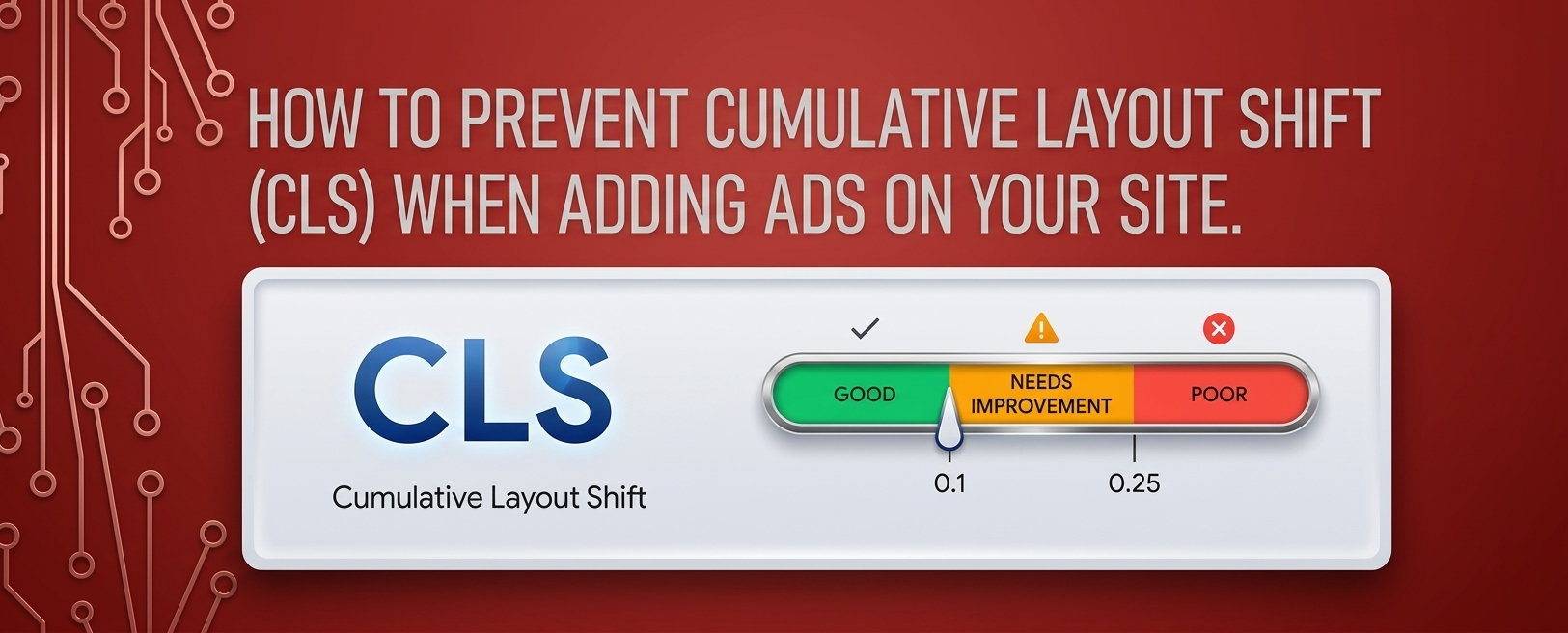
    Goal: A CLS score of 0.1 or less is considered good.

    Largest Contentful Paint (LCP):

    Definition: Measures loading performance. It marks the point in the page load timeline when the largest text block or image is rendered on the screen.

    Goal: An LCP of 2.5 seconds or faster is considered good.

    First Input Delay (FID):

    Definition: Measures interactivity. It quantifies the time it takes for a user to interact with a page (e.g., clicking a link or button) until the browser responds.

    Goal: An FID of 100 milliseconds or less is considered good.

    Cumulative Layout Shift (CLS):

    Definition: Measures visual stability. It assesses how much the page layout shifts during the loading process, which can lead to poor user experience.

  • How Core Web Vitals Affect Site Monetization?

    How Core Web Vitals Affect Site Monetization?

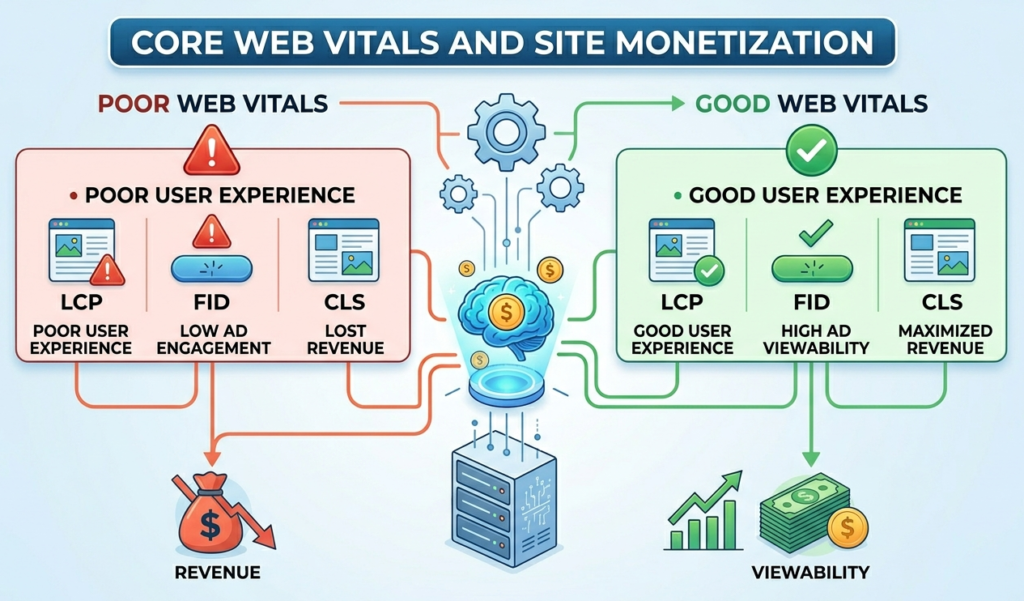
    To enhance your website’s monetization potential, it’s essential to monitor and optimize your Core Web Vitals. By ensuring your site loads quickly, responds to user interactions promptly, and maintains visual stability, you can improve user experience, increase traffic, and ultimately boost your revenue from ads.

    Sites that prioritize and optimize for Core Web Vitals may gain a competitive advantage over others in the same niche. A better user experience can lead to increased user loyalty, return visits, and improved conversion rates.

    Impact on SEO Rankings:

    Google uses Core Web Vitals as a ranking factor in its search algorithm. Websites that provide a better user experience through improved Core Web Vitals are more likely to rank higher in search results. Higher visibility can lead to increased traffic and potentially higher ad revenue.

    User Experience:

    Poor Core Web Vitals can lead to a frustrating user experience, causing visitors to leave the site quickly (higher bounce rates). This can negatively impact ad impressions and engagement, which in turn can lower monetization potential.

    Ad Revenue:

    Ad networks, including Google AdSense, may prioritize or recommend websites with good performance metrics. Sites with poor Core Web Vitals may face lower CPM (cost per thousand impressions) rates due to decreased user engagement and higher bounce rates.

    Compliance with Standards:

    Many advertising partners and networks now consider Core Web Vitals when approving websites for monetization. Websites that do not meet the minimum performance thresholds may struggle to get approved or may face restrictions in their ad serving capabilities.

    Competitive Advantage:

    Sites that prioritize and optimize for Core Web Vitals may gain a competitive advantage over others in the same niche. A better user experience can lead to increased user loyalty, return visits, and improved conversion rate

  • How to prevent Cumulative Layout Shift (CLS) when adding Ads on your site.

    How to prevent Cumulative Layout Shift (CLS) when adding Ads on your site.

    To prevent ads from causing layout shifts on your site, it’s important to implement best practices for ad placement and sizing. Here are some effective strategies:

    1. Specify Size for Ad Containers

    • Always define the width and height of your ad units in pixels or percentages. This ensures the browser reserves space for the ad before it loads.
    <div class="ad-container" style="width: 300px; height: 250px;">
    <script>/* Ad code here */</script>
    </div>

    2. Use Responsive Ads Carefully

    • If using responsive ad units, ensure the parent container has a defined aspect ratio. This helps maintain layout integrity during loading.
    .responsive-ad {
    width: 100%; /* Full width */
    height: auto; /* Maintain aspect ratio */
    padding-bottom: 75%; /* Example aspect ratio for 300x250 */
    position: relative; /* Position relative for absolute child */
    }

    3. Implement a Placeholder for Ads

    • Create a placeholder or a “dummy” ad container with fixed dimensions. This helps prevent layout shifts while the ad loads.
    code<div class="ad-placeholder" style="width: 300px; height: 250px;">
    <!-- Placeholder content -->
    </div>

    4. Reserve Space for Ads in CSS

    • Use CSS to ensure there’s a reserved space for the ad. This can be particularly useful for dynamic ads where the size might vary.
    code.ad-space {
    width: 300px; /* Fixed width */
    height: 250px; /* Fixed height */
    overflow: hidden; /* Hide overflow */
    }

    5. Load Ads Asynchronously

    • Load ads asynchronously to prevent them from blocking the rendering of other content. This can improve the overall loading experience.
    <script async src="https://your-ad-script.js"></script>

    6. Use Lazy Loading for Ads

    • Consider lazy loading ads that are off-screen. This can help manage loading times and prevent layout shifts for ads that aren’t immediately visible to the user.
    code<div class="lazy-ad" data-src="your-ad-code">
    <!-- Lazy loading logic -->
    </div>

    7. Minimize the Use of Pop-Up Ads

    • Avoid using pop-up ads that cover the main content and cause shifts when they appear. Instead, consider using static banners that fit within the layout.

    8. Test Your Ads Setup

    • After implementing your ads, use tools like Google PageSpeed Insights or Lighthouse to check your CLS score and see if the ads are causing any layout shifts.

    9. Regularly Update Ad Sizes

    • Stay updated with the latest ad sizes recommended by ad networks and make sure your site accommodates these dimensions properly.

    Conclusion